Added: Inbox Filtering by Team
19 Dec 2025

Elizabeth Long
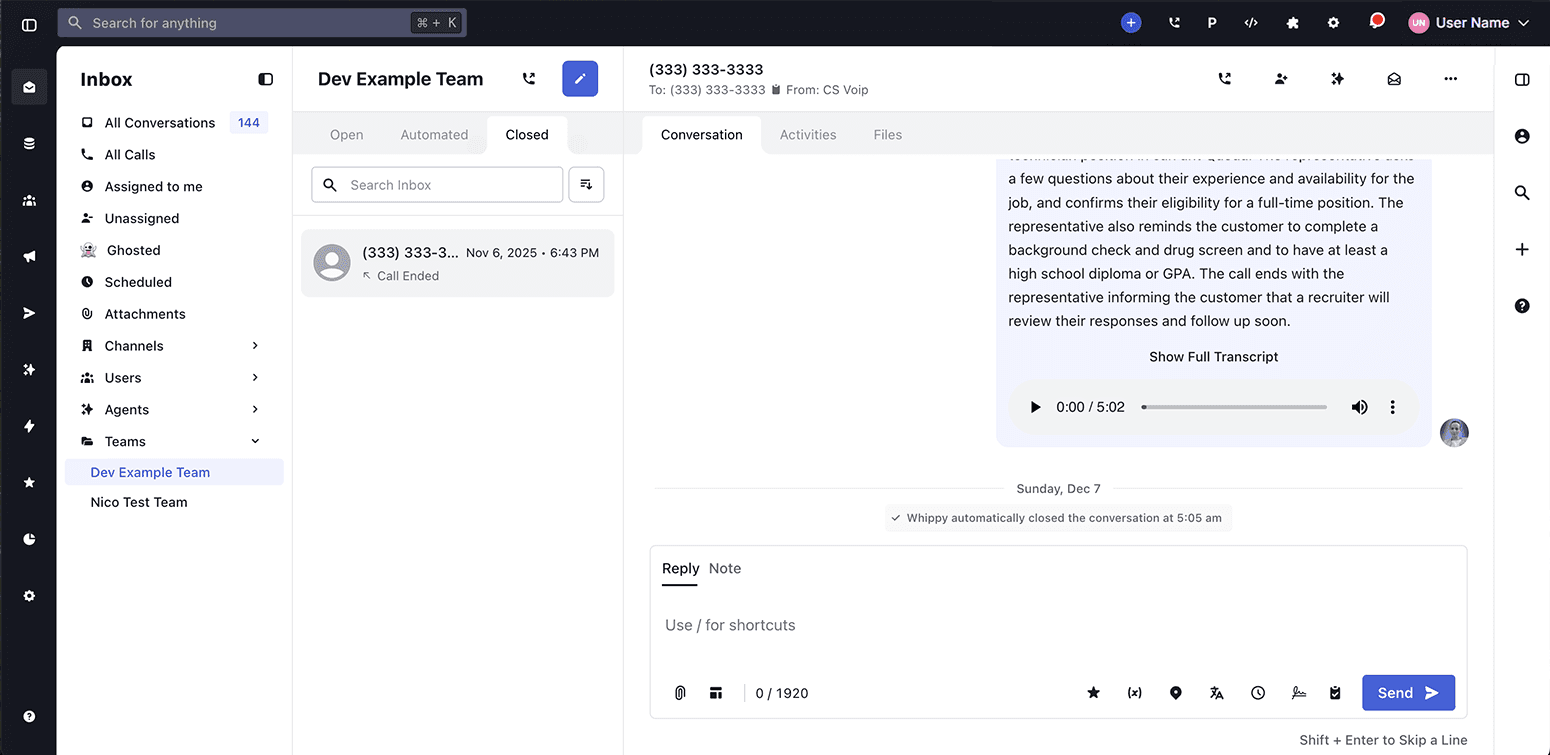
Whippy added a Teams filter to the Inbox, making it easier to view and manage conversations assigned at the team level.
How It Works
The Inbox on the Whippy dashboard now includes a Teams dropdown filter for users who belong to one or more teams.
- The Teams filter appeared in the Inbox sub-menu.
- It displayed all teams the user is assigned to.
- Selecting a team filtered the Inbox to show only conversations assigned to that team.
- The filter followed the same behavior as existing Channels and Users filters.
- Users who were not part of any teams did not see the Teams filter.
This update worked automatically. No setup or configuration was required.
Why It Matters
Team-based inbox management is essential for organizations handling high message volume across multiple departments or roles.
Before this update, users could not isolate conversations by team, which made prioritization and ownership harder to track. With team-level inbox filtering, users can now:
- Focus on conversations relevant to their specific team.
- Clearly see team ownership alongside individual assignments.
- Reduce inbox noise and improve response efficiency.
- Use consistent filtering patterns already familiar from Channels and Users.
This change improved shared inbox organization, team collaboration, and day-to-day workflow efficiency across the Whippy platform.