Changed: Dynamic Form Submission Email Routing
20 Mar 2026

Elizabeth Long
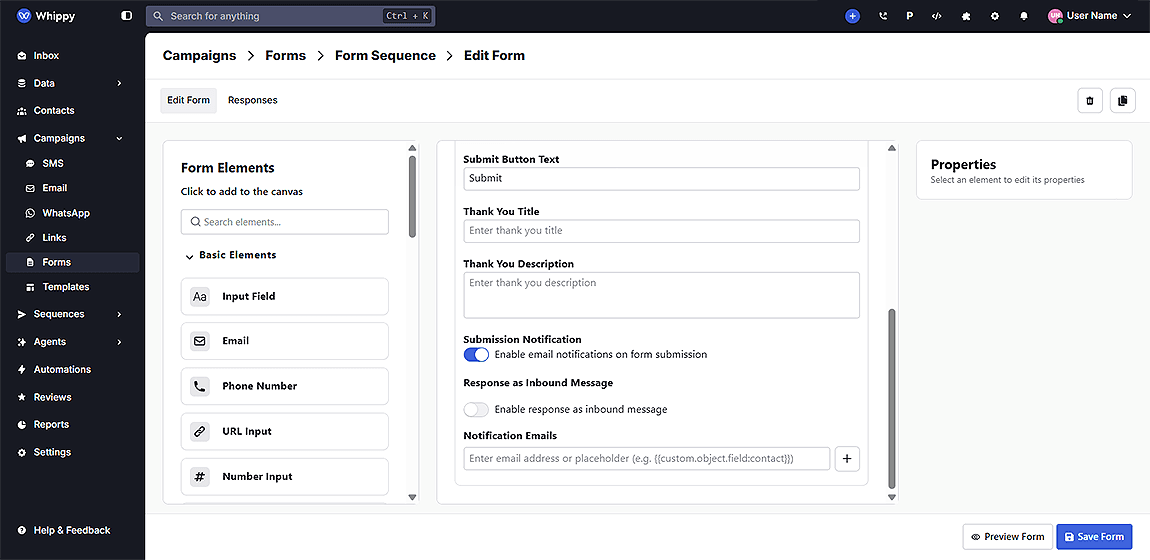
Form submission notifications now support dynamic recipients using contact custom data, allowing emails to be routed based on contact ownership or synced fields.
What’s included
You can now configure notification recipients using static and dynamic values. This update:
- Adds support for dynamic email recipients using contact custom data
- Allows combining static email addresses and dynamic placeholders
- Removes the need for external automation or custom integrations
How it works
When a form is submitted, Whippy reads the contact record and resolves any dynamic fields into email addresses.
You can define recipients as:
- A standard email address
- A dynamic field (for example, recruiter or owner email stored in contact data)
Notifications are then sent to all valid recipients, combining both static and dynamic values.
Why it matters
Notifications are now sent based on who is actually responsible for the contact, not just a fixed list.
- Improves accuracy of form submission alerts
- Reduces manual routing and dependency on third-party tools
- Supports scalable email notification automation workflows
This is especially useful for teams using CRM or ATS data to manage ownership and assignments.
Notes
- Dynamic fields must contain a valid email address
- If no value is found, that recipient is skipped
- Static and dynamic recipients can be used together