Added: Recording Duration on the All Calls Page

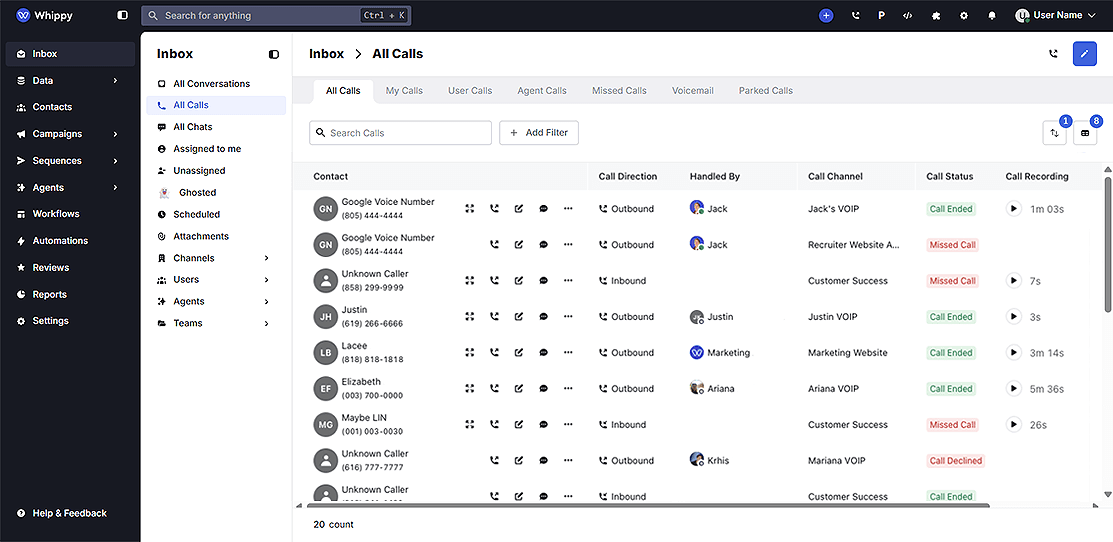
Recording Duration is now visible on the All Calls page, showing the exact length of playable audio for every call and voicemail.
What's Included
- Recording Duration displayed next to the audio playback button for all calls and voicemails
- Visible alongside the existing Call Duration field for direct comparison
How It Works
Each call record now shows two distinct time values:
Field | What It Measures |
|---|---|
Call Duration | Total time from answer to disconnect, including IVR navigation and pre-recording activity |
Recording Duration | Exact length of the audio file that was captured and saved |
These values will often differ. A call may show a Call Duration of 1m 01s with a Recording Duration of only 3s, because the caller navigated IVR menus before the voicemail recording started, or recording was initiated partway through the call.
Why It Matters
Call Duration alone doesn't tell you how much audio is actually available to review. Recording Duration lets support and QA teams prioritize reviews by real audio length and spot recording gaps without opening each file individually.
Notes
- Differences between Call Duration and Recording Duration are expected behavior, not an error
- If Recording Duration consistently appears shorter than expected, review your IVR configuration or recording trigger settings in your Whippy account