Changed: Clearer Transcript Tool Call Display UI
03 Apr 2026

Elizabeth Long
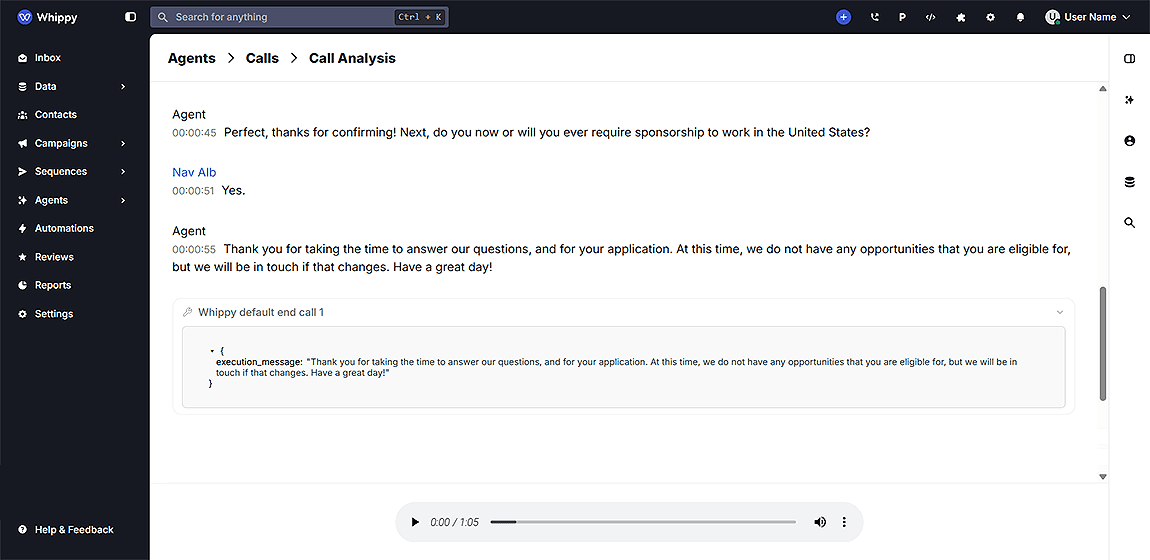
We improved the transcript interface to make tool calls easier to read and understand.
What’s included
- Structured display of tool calls in chat and call transcripts
- Clear separation of tool name, input, and output sections
- Collapsible views for expanding or hiding details
- Syntax-highlighted JSON for better readability
- Cleaner layout for scanning AI interactions
How it works
Tool calls now appear as structured blocks inside transcripts. Each block shows the tool name, followed by clearly separated input and output sections. Users can expand or collapse these sections as needed. JSON responses are formatted and syntax-highlighted to improve visibility and reduce parsing effort.
Why it matters
This update reduces time spent reading raw JSON and improves clarity when reviewing AI actions. Teams can quickly understand what the AI executed, what data was passed, and what results were returned. This supports faster debugging, better auditing, and improved workflow visibility across messaging and voice interactions.
Notes
- This update applies to both chat and call transcripts
- No changes are required to existing workflows or integrations
- The improvement is available automatically within the platform