Advanced Multi-Value Filtering for Contact Lists

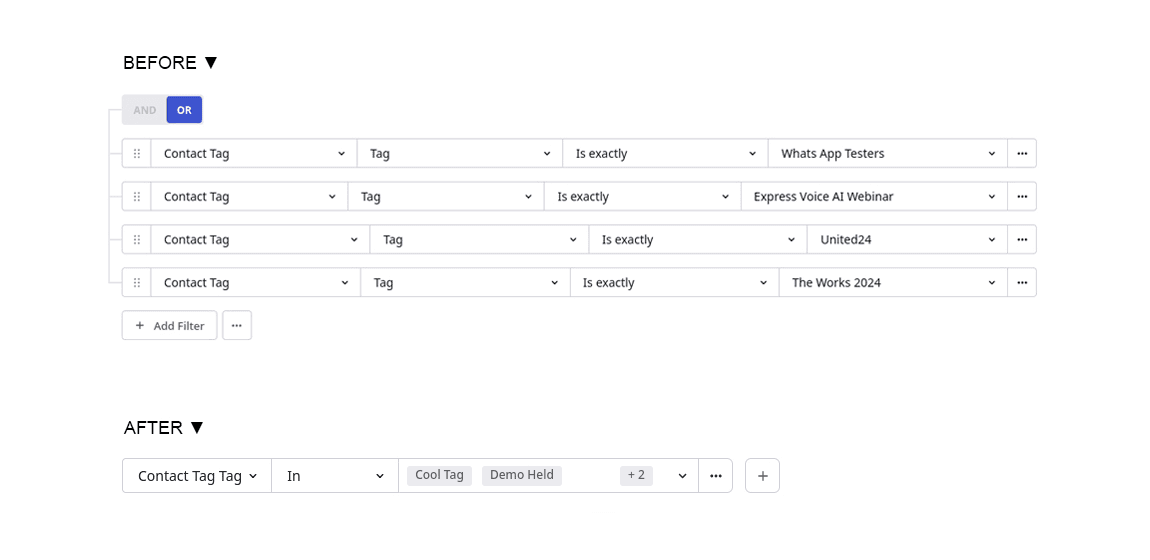
Managing and filtering contact data is now faster, easier, and more intuitive. With our latest update, you can apply multi-value filters when working with contact lists, allowing you to select multiple values within a single filter rule, instead of creating one filter per value.
What’s New
Previously, if you wanted to filter contacts by multiple values (for example, contacts with the tags Promo-US, Promo-EU, and Promo-APAC) you had to create separate filters for each tag. This was time-consuming and made complex filtering harder to manage.
With the new multi-select filtering, you can now:
- Choose multiple values within a single filter.
- Apply the filter across various contact attributes like tags, locations, and other list-type fields.
- Simplify your filter logic using the intuitive In comparison operator.
How It Works
To use the new advanced filtering:
1. Go to the Contacts screen.
2. Click Add Filter.
3. Choose your filter category (e.g., Contact Tag).
4. Set the comparison operator to “In”.
5. Select one or more values from the dropdown list (e.g., Promo-US, Promo-EU, Promo-APAC).
The filter will return all contacts that match any of the selected values, using logical OR behavior, all within a single, easy-to-manage filter rule.
Why it Matters
- Faster filtering workflows: Apply fewer rules for better results.
- Cleaner UI: Avoid clutter from multiple filter rows.
- Flexible segmentation: Works across all screens that support advanced filtering.
- Optimized performance: Even with many values selected, filters run using a single, efficient backend query.