Auto-Close Chat Agent Sessions with Timeouts

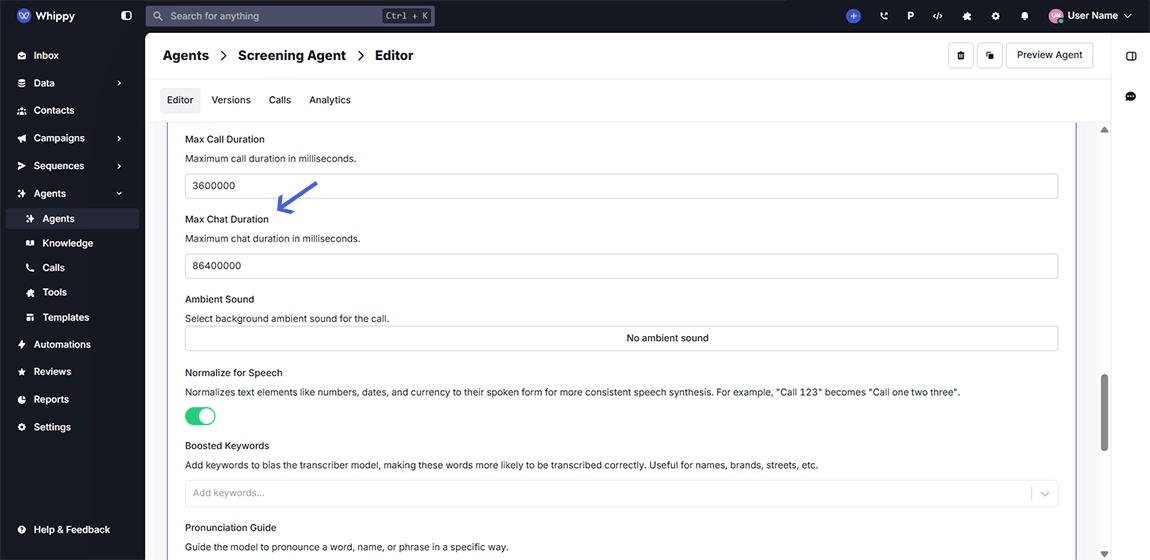
Whippy now auto-closes chat agent sessions after a defined period of inactivity, so you never leave a session open longer than needed.
Managing chat-based automations is all about precision and context. With our new Maximum Duration Timeout setting, you can now ensure chat agent sessions automatically close after a set time, eliminating zombie sessions and stale conversations.
What’s New?
You can now configure a maximum session duration for each AI chat agent. Once the defined time limit is reached, the session will close, whether or not the agent or contact ends it manually.
This prevents situations where:
- The contact leaves mid-conversation, but the agent remains active
- A response comes in days/weeks later, triggering a reply from an out-of-context session
- Automation logic misfires because of unintended session persistence
How It Works
- The default timeout for all existing chat agents is set to 1 day
- You can customize the duration per agent via:
Agent Editor → Agent Settings → Max Duration Timeout - After the configured time elapses, the session will automatically close, resetting the context for the next conversation
Why This Matters
Stale chat sessions can lead to:
- Confusing customer experiences
- Irrelevant AI replies triggered too late
- Misleading analytics on session length or completion
With automatic session closure, your team gains:

Cleaner chat histories
More accurate agent context
Better control over automation windows
Fewer manual cleanup tasks
Whether you're using Whippy for customer support, recruiting workflows, or lead qualification, this update ensures your agents respond in real time, and only when it makes sense.