Added: Copy and Paste for Workflow Branches
24 Jul 2026

Elizabeth Long
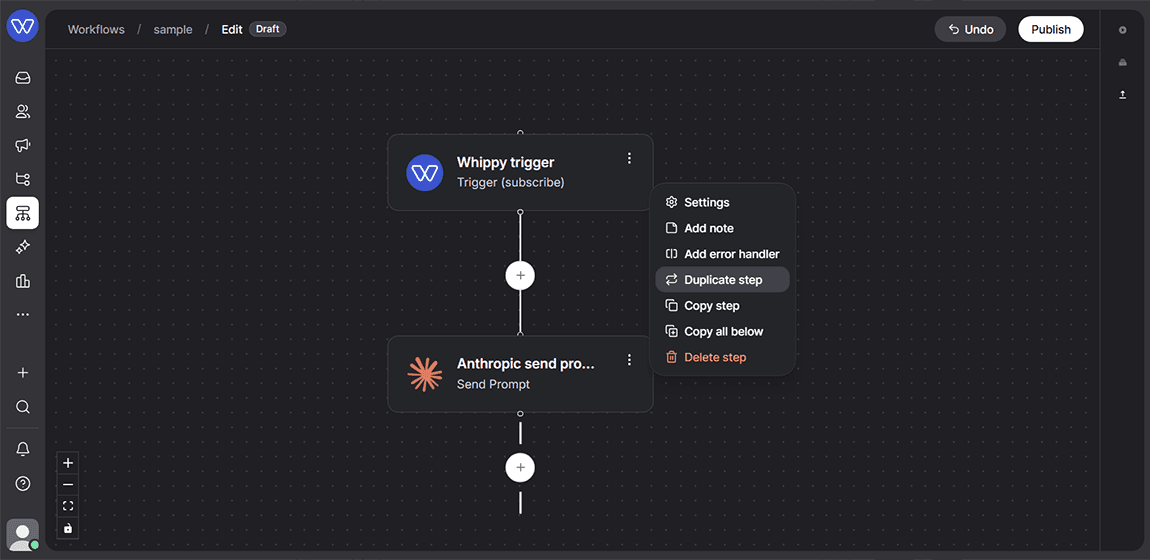
Workflow Builder now lets users copy a full sequence of steps and paste it into another part of the same workflow or into a different workflow entirely.
What's included
- Copy any step and everything below it, including all existing configuration
- Paste the copied branch below another step
- Paste the copied branch in place of an existing step, replacing it
- Paste the copied branch into a different workflow
How it works
- Open a workflow in edit mode.
- Open the menu on the step where the copy should start.
- Select Copy workflow from this point down.
- Go to the destination step, in the same workflow or a different one.
- Choose to paste the branch below the selected step or replace it.
- Whippy adds the copied steps with the same configuration as the original branch.
Why it matters
Workflows with repeated logic used to require manual rebuilding, step by step, field by field. This update removes that repetition. Teams can now duplicate proven workflow branches, reuse them across multiple workflows, and cut down on setup errors that come from manually recreating configuration.
Notes
Pasted steps retain their original configuration. Users can still edit any step after pasting to adjust it for the new context.