Added: Funnel Charts Can Follow the Same Contacts
04 Sep 2026

Elizabeth Long
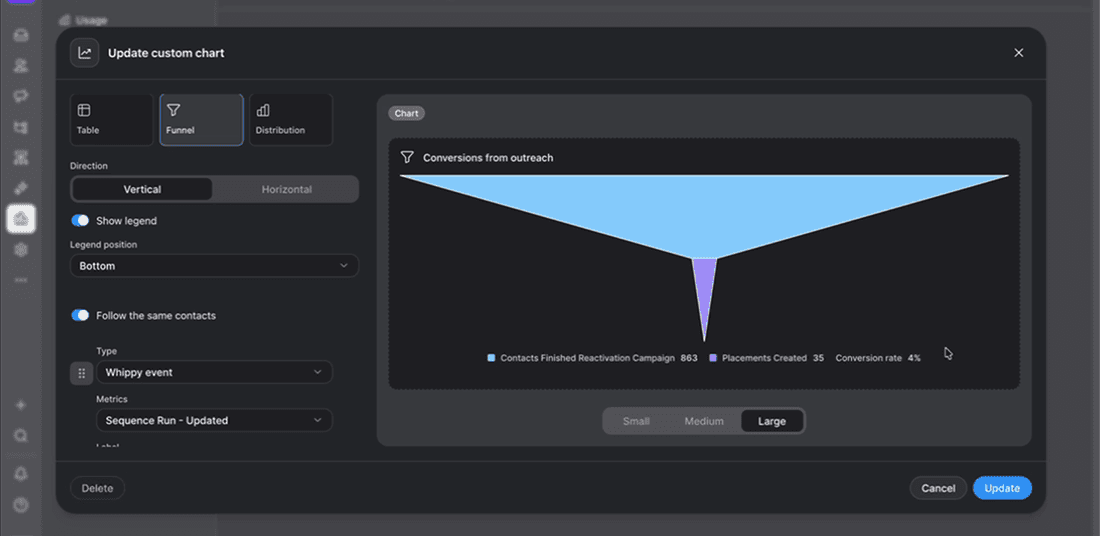
Funnel charts in custom reports can now follow the same contacts from stage to stage, showing step-to-step percentages and an overall conversion rate when enabled.
What's included
- Follow the same contacts toggle: A new toggle in the funnel chart builder links each stage to the one before it, so every step reflects contacts who actually came from the previous stage. Off by default.
- Unique contact counting: When enabled, each stage counts unique contacts, even if a contact went through a sequence or generated a result more than once.
- Step-to-step percentages and conversion rate: With the toggle on, each stage shows what percentage of the previous stage reached it, and the legend displays a first-to-last stage conversion rate.
How it works
Turn on "Follow the same contacts" in the funnel chart builder to connect each stage to the one before it. Once enabled, each stage counts only unique contacts carried over from the previous stage, so the funnel never grows between stages, and percentages calculate automatically.
Why it matters
By default, funnel stages show unrelated counts with no connection to each other, which still works for some use cases. But when the toggle is on, conversion rate between stages become visible without manual calculation, and the funnel reflects how contacts actually move through a sequence or process.
Notes
- Off by default. Existing saved funnel charts are unchanged unless the toggle is switched on.
- Percentages and conversion rate only appear when this toggle is on, since disconnected stages would produce misleading percentages.
- Applies to funnel charts in custom reports only, not campaign goal funnels.