Manually End Chat Agents from Conversation UI

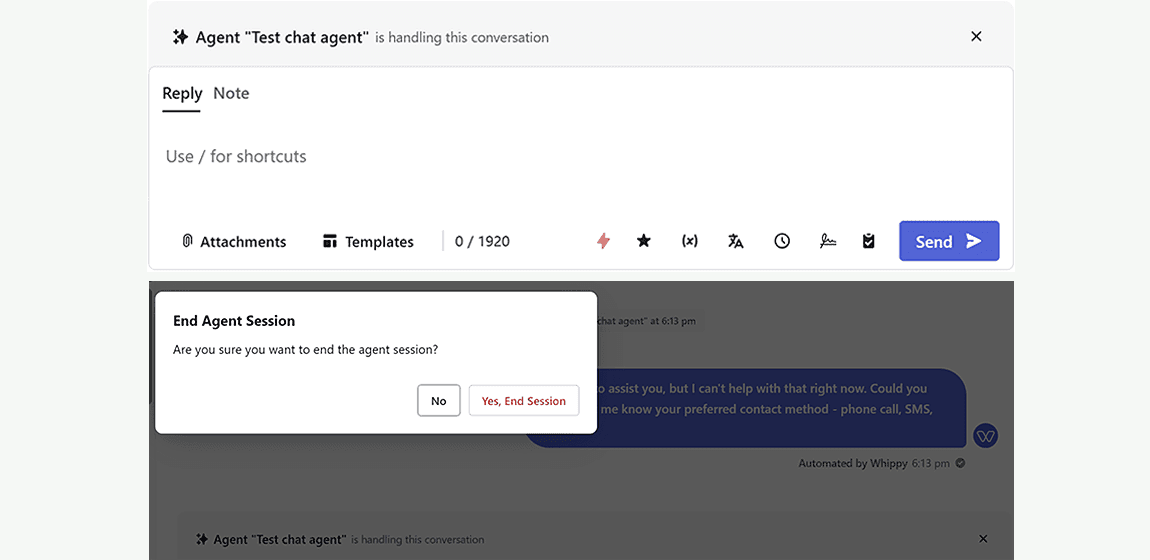
Take full control over your AI chat sessions, right from the Conversation view.
Whippy now gives you the ability to manually end an active chat agent session from within the Conversation UI. This adds a new layer of flexibility for teams who want more visibility and control over AI interactions in real-time.
What’s New
You’ll now see the active chat agent visibly marked at the top of any conversation where it’s running. Next to it, you’ll find a “✕” icon, clicking this allows you to immediately end the session.

New in-conversation indicator for active chat agents
Manual session termination with confirmation
Works alongside existing session timeouts and auto-end logic
Why It Matters
Previously, agent sessions could only end in two ways:
1. When the agent itself completed its logic or instructions
2. When a maximum session duration (e.g., 1 day) was reached
Now, with manual agent termination, users can step in and close the session at any time, avoiding unnecessary responses or delayed follow-ups, especially helpful when:
- The contact abandons the conversation
- The agent becomes irrelevant mid-conversation
- You want to resume the conversation manually or switch context
How to Use It
1. Navigate to any active chat conversation
2. Look for the active agent banner
3. Click the “✕” icon on the right
4. Confirm with “Yes, End session”
Ideal For:
- Recruiters who need to step in manually mid-thread
- Customer support agents resolving tickets with personal follow-up
- Admins testing and troubleshooting AI logic in real-time