Fixed: Sender Name/Email Resolve in Previews

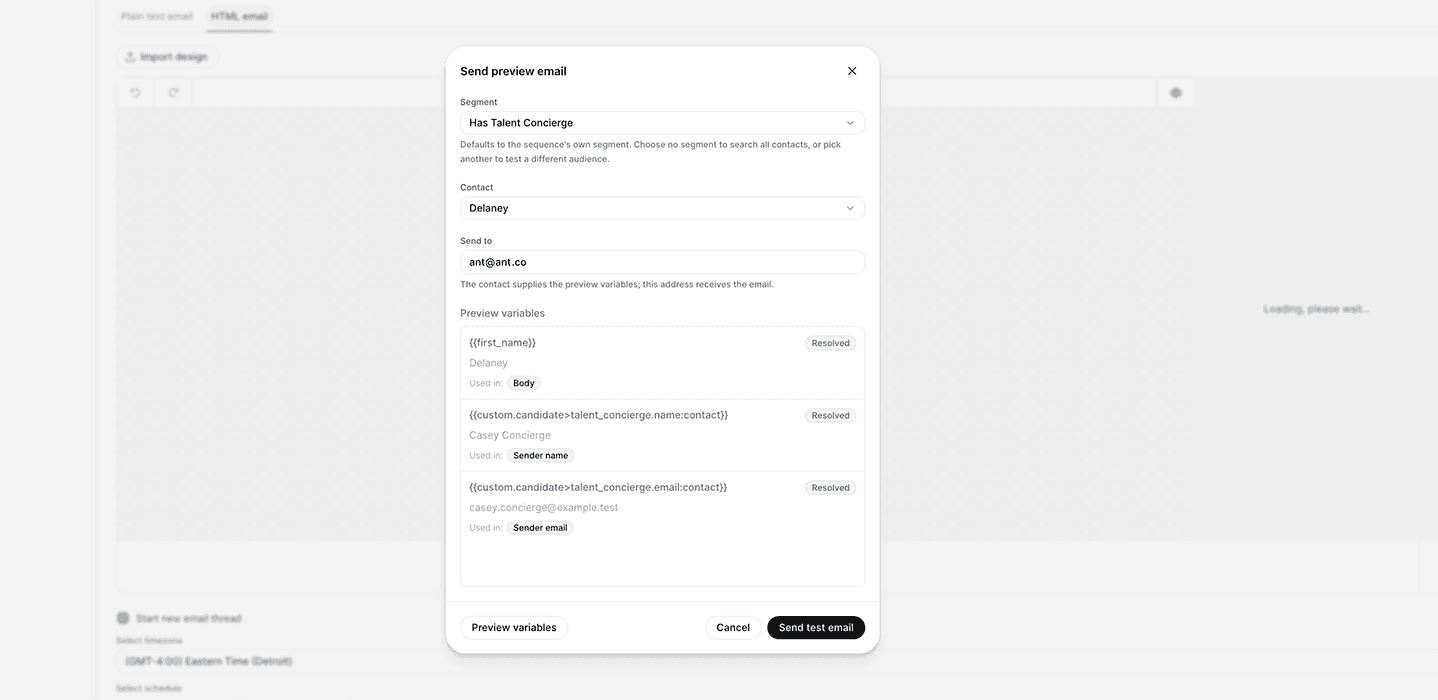
Test and preview emails now resolve Sender Name and Sender Email variables using the selected contact.
What's included

Sender Name and Sender Email fields now resolve contact variables in test and preview emails
Preview behavior for these fields now matches how body, subject, and CC/BCC already worked
Applies to previews across sequences, campaigns, and Send Email actions
How it works
When you send a test or preview email, Whippy now pulls the selected contact's data into the Sender Name and Sender Email fields, the same way it already does for the message body, subject, and CC/BCC. If your sender fields are mapped to custom data (for example, a recruiter's name and email address), the preview shows the resolved values for whichever contact you selected.
Why it matters
Previously, preview emails filled in the message content correctly but left Sender Name and Sender Email unresolved, showing raw variables instead of actual values. This made it look like personalization wasn't working, even though live sends were already resolving these fields correctly. Preview now reflects exactly what contacts receive, so teams can verify sender personalization before a campaign or sequence goes live.
Notes
This is a display fix for previews only. Live sends were not affected and already resolved Sender Name and Sender Email correctly.