Added: TempWorks Workflows Integration

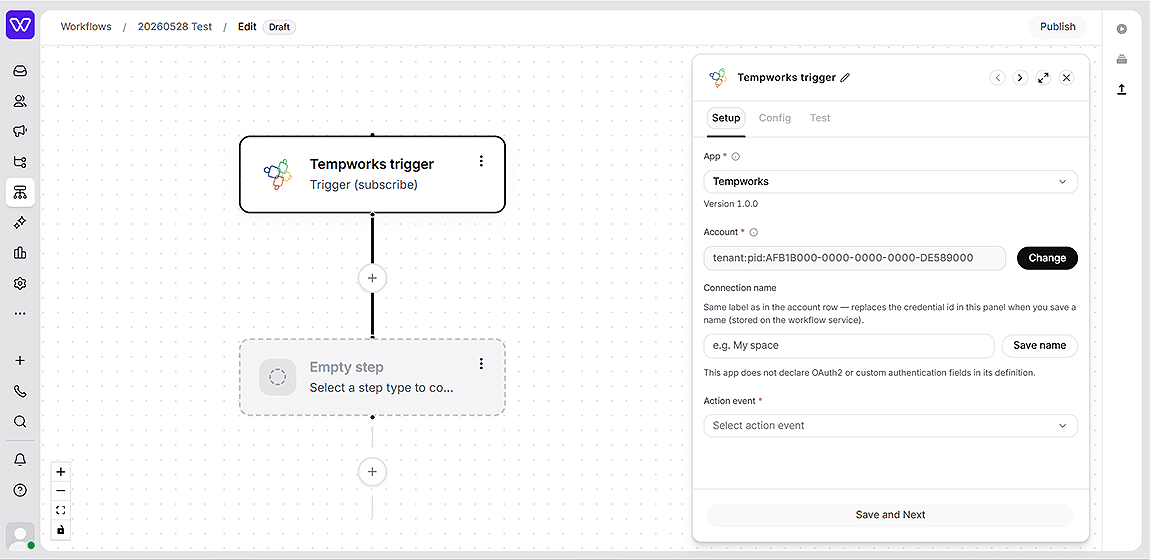
Whippy now connects directly to TempWorks from the workflow builder, letting staffing teams automate operations on live TempWorks data without custom middleware or manual HTTP requests.
What's included
- Search & lookup: Search employees, contacts, customers, job orders, and assignments using standard filters, and advanced search queries. Load datalists for branches, service reps, statuses, and more.
- Create & update records: Create and update employees, contacts, job orders, and assignments. Post messages, tasks, documents, candidates, onboarding steps, and financial records. Supports document and resume uploads.
- Webhook triggers: Subscribe to real-time TempWorks events including new employees, job order status changes, new contact messages, document uploads, custom property changes, and more.
How it works
The TempWorks app is available directly inside the Whippy workflow builder. Once connected, you can add TempWorks actions and triggers to any workflow the same way you would with any other app.
Authentication requires only your TempWorks tenant and product identifiers (ACR values). Your credentials are stored encrypted and exchanged for a secure access token on each request.
Example workflow: A workflow triggers when a new contact message arrives in TempWorks. A condition checks the message action type. If it matches Client inquiry, the workflow sends a follow-up email via Whippy messaging and updates the contact's status in TempWorks. If it doesn't match, the workflow ends with no side effects.
Why it matters
Staffing operations run on TempWorks. Until now, connecting those records to automated communication and downstream processes required custom-built middleware or one-off API calls.
This integration makes TempWorks a first-class part of Whippy workflows, so teams can build end-to-end automations that read, write, and react to TempWorks data in real time, without engineering overhead.
Setup
- Open the Whippy workflow builder and add a new workflow or edit an existing one.
- Search for TempWorks in the app list.
- Connect using your TempWorks ACR credentials (tenant:… / pid:…).
- Add TempWorks trigger or action steps to your workflow.
Notes
- The integration covers the TempWorks Open API and Webhooks API.
- Each customer authenticates with their own credentials. No shared access between accounts.