Added: Call Transfer Handoff Notes & Context Labels

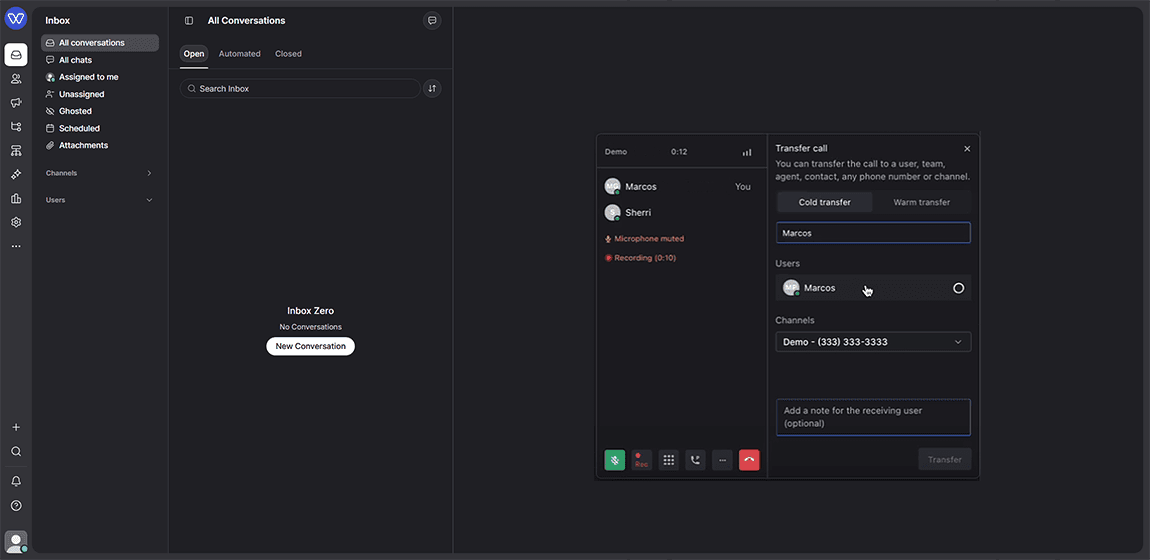
Agents can now attach a note and see who transferred a call before they pick up.
What's included
- Optional transfer notes: agents can add a plain-text note explaining the reason for a transfer before sending the call
- Automatic sender labeling: every transferred call displays a "Transferred from [Agent Name]" badge, even when no note is added
- Support for both warm (attended) and cold (blind) transfers
How it works
When transferring a call, agents can type a short note into the transfer panel, for example, "Customer wants a refund on last month's invoice". The receiving agent sees this note along with a badge showing who sent the call, right on their incoming call card, before they answer.
Why it matters
Agents previously received transferred calls with no context, which meant customers had to repeat their issue and re-introduce themselves to every new agent. With handoff notes and context labels, receiving agents know who's calling and why before they pick up, so customers get answered faster and don't have to explain themselves twice. This is especially useful for teams routing calls between frontline support and specialists in Whippy's VoIP platform.
Setup
No setup required. Handoff notes and context labels are available by default on all warm and cold transfers.
Notes
Transfer notes are plain text only and are visible only to the receiving agent, not the caller.