Added: Undo Support for Workflow Step Creation and Deletion

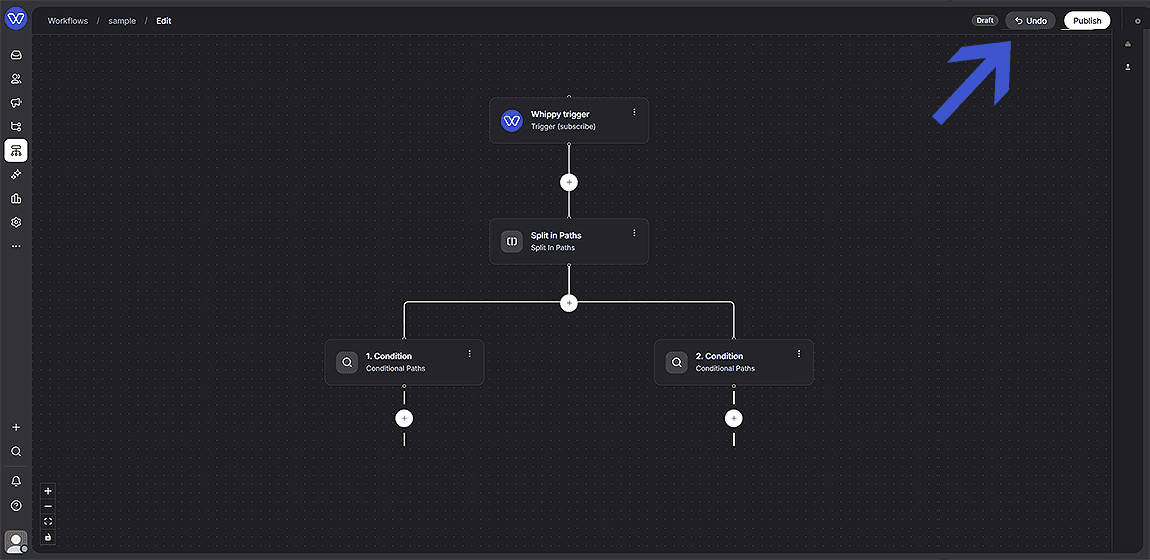
Whippy added Undo support to the Workflow Builder, letting users instantly restore up to 3 consecutive steps or branches after an accidental deletion or creation.
What's Included
- Undo button in the editor header. A new Undo control is available directly in the Workflow Builder header while editing a workflow.
- Coverage for creation and deletion. Undo reverts both the deletion of one or more steps and the creation of new steps, including entire branches within a Split Path.
- Multi-step undo. Undo supports up to 3 consecutive changes, allowing users to revert more than one accidental deletion or creation in a row.
- State restoration. The Workflow Builder preserves previous workflow states, so reverting a change restores deleted steps or removes newly created ones without requiring a manual rebuild.
How It Works
While editing a workflow, step creation or deletion can be reversed with a single click:
- Open a workflow in edit mode.
- Create or delete one or more workflow steps.
- Click Undo in the Workflow Builder header to revert the most recent change. Undo supports up to 3 consecutive clicks, reverting multiple changes in sequence.
- The workflow immediately returns to its previous state, restoring deleted steps or reverting newly created ones.
Why It Matters
Workflow building involves frequent experimentation, and a single deletion inside a Split Path can remove an entire branch of downstream steps. Rebuilding that logic manually costs time and increases the risk of missing a step. Undo removes that risk, even across multiple consecutive changes. Teams can test changes, delete steps, and adjust branches in the Whippy Workflow Builder without worrying about losing work.
Setup
No setup is required. The Undo button is available by default in the Workflow Builder header for all workflows in edit mode.