Fixed: Missing Sample Warnings for Mapped Workflow Fields

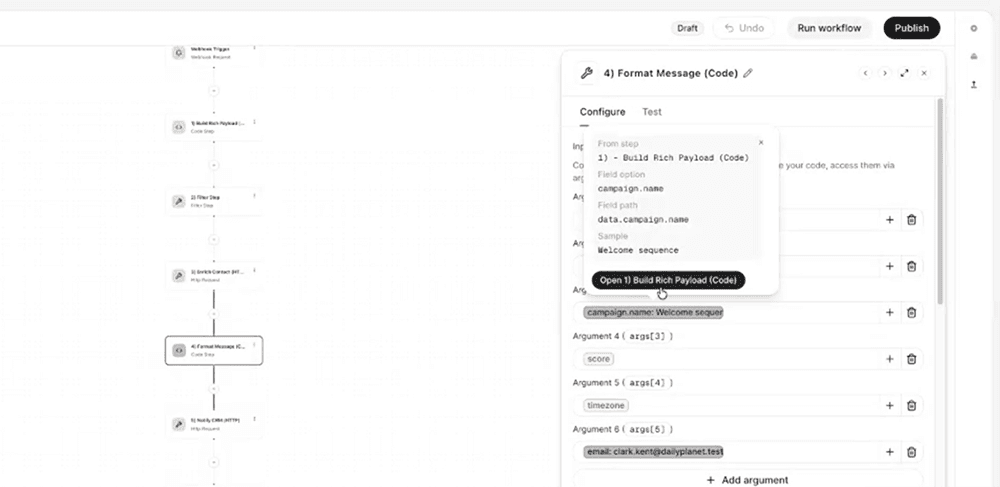
Workflow fields now show a clear warning when the mapped data isn't available in the upstream sample, replacing silent, hard-to-diagnose mapping failures with actionable, in-context guidance.
What's included

Missing sample warnings: A mapped field displays a warning when the selected field is missing from the current upstream sample, the upstream step has no sample captured yet, or the referenced step no longer exists in the workflow.
Actionable popover: Clicking or hovering the warning opens a popover that identifies exactly what's missing and which step is causing it.
Direct step navigation: From the popover, users can jump straight to the upstream step and select or capture a new sample that includes the required field, without leaving the current view.
Healthy mapped fields also get a hover popover with the sample value, field path, and a link to the source step.
How it works
Previously, a mapped field could appear correctly configured in the workflow builder even when its underlying data wasn't present in the upstream sample. This made it look like a field mapping error when the real issue was missing sample data, and troubleshooting meant manually checking each upstream step.
Now, Whippy workflows detect this mismatch automatically. When a mapped field's data isn't in the current sample, the field flags a warning instead of failing silently. Clicking into the warning shows the specific cause (missing field, no sample, or a broken step reference) and links directly to the step that needs attention, so the fix is one click away.
Why it matters
- Removes ambiguity: Users can immediately tell whether a workflow issue is a sample data problem or an actual field mapping error, cutting down on unnecessary debugging.
- Speeds up troubleshooting: Instead of manually reviewing each step in a workflow to find the source of a broken preview, users go directly to the step that needs an updated sample.
- Improves workflow reliability: Catching missing sample data early prevents downstream issues in automations and integrations built on those mapped fields.
Notes
Existing workflows are covered automatically by this update. No reconfiguration is required for warnings to start appearing on affected mapped fields.