


Table of Contents
- What Is Omnichannel Messaging?
- The Pattern We See Across Whippy Customers
- Omnichannel vs. Multichannel: The Real Difference
- Why Omnichannel Messaging Matters for Growing Businesses
- The Core Channels and When to Use Each
- How to Implement an Omnichannel Messaging Strategy
- Step 1: Map your customer journey by channel
- Step 2: Audit your current tools and identify the gaps
- Step 3: Choose a platform built for native unification
- Step 4: Build your automation layer thoughtfully
- Step 5: Define SLAs for every channel and measure them weekly
- Step 6: Analyze, refine, and update your sequences quarterly
- Omnichannel Messaging Best Practices
- Real-World Omnichannel Messaging Case Studies
- Omnichannel Messaging Pricing: What to Expect
- How to Choose the Right Omnichannel Messaging Platform
- The Difference Between a Platform & a Partnership
- Frequently Asked Questions
Try Whippy for Your Team
Experience how fast, automated communication drives growth.
Quick answer:
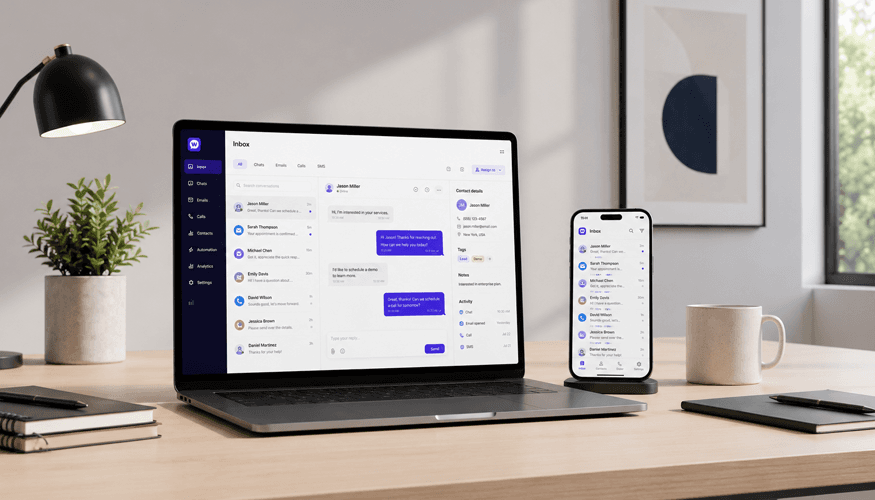
Omnichannel messaging is a customer communication strategy that unifies SMS, email, live chat, and voice into a single, context-aware conversation. Every channel shares one continuous history, so customers never repeat themselves and your team never loses context. It is the core difference between a multichannel communication platform, where each channel operates in its own silo, and a true omnichannel messaging solution, where every interaction builds on the last.
What Is Omnichannel Messaging?
Omnichannel messaging is a customer communication strategy that unifies SMS, email, live chat, and voice into one shared, continuous conversation. Unlike a basic multichannel communication platform where each channel has its own inbox and history, a true omnichannel messaging solution carries full context across every channel switch. When a prospect texts on Monday, emails on Tuesday, and chats on Wednesday, the person responding on Wednesday already has everything from Monday and Tuesday in front of them.
That single capability, persistent context across channels, is what separates genuine omnichannel communication software from tools that are simply present on multiple channels. It is also what separates an omnichannel communication platform that drives results from one that just consolidates notifications. The difference shows up in response times, conversion rates, customer retention, and the amount of time your team spends reconstructing conversations that should never have been fragmented in the first place.
A genuine omnichannel messaging platform has three non-negotiable characteristics:

A unified inbox. Every message from every channel lives in one place, visible to the entire team in real time.
Persistent conversation history. When a customer switches from SMS to email to chat, the thread continues unbroken. Nothing resets.
Cross-channel automation. Workflows trigger actions across channels based on customer behavior, response patterns, and conversation stage, not just within a single channel.
What omni-channel messaging is not: a dashboard that links to separate tools, a shared email inbox with a chat widget bolted on, or a platform that calls itself omnichannel because it supports two channels. Those are multichannel setups with a different name.
The Pattern We See Across Whippy Customers
Before going deeper into strategy and implementation, it is worth saying something that most omnichannel messaging guides skip: the results are not evenly distributed.
Businesses that switch from fragmented tools to a unified omnichannel messaging platform do not just get incrementally better. The improvement tends to be structural and compounding. Looking at what Whippy customers have documented:
- Staffworks, a staffing firm managing 1,000+ applicants per week, saved $1.1M annually and increased recruiter productivity by 74% after unifying candidate communication through Whippy's AI Agents.
- Lyneer Staffing, operating across 100 US locations, improved response rates 12x and cut time-to-fill by 52% after replacing multiple disconnected tools with a single omnichannel platform.
- David Altman at Marcus and Millichap generated a $198K commission on a single deal after using Whippy to keep high-intent buyers engaged via SMS throughout a live auction, including a final-minute surge that raised the sale price by 22%.
The pattern across these cases is consistent: unifying channels does not just reduce friction. It compounds results, because every interaction builds on context from the last one. Recruiters stop reconstructing candidate history and start placing people. Agents stop losing buyers between touchpoints and start closing deals. The platform is the same. What changes is the continuity.
That is what this guide is about.
Omnichannel vs. Multichannel: The Real Difference
The terms are genuinely different, and conflating them leads to buying the wrong tool and wondering why the results are not there.
Multichannel | Omnichannel | |
|---|---|---|
Channel management | Each channel is its own silo | All channels share one interface |
Conversation history | Resets at every channel switch | Continuous across every touchpoint |
Customer experience | Customer repeats context each time | Seamless, agent already knows the history |
Team workflow | Switch between platforms | Single unified dashboard |
Automation scope | Within one channel | Across channels, triggered by behavior |
Data | Fragmented by channel | Consolidated, actionable, real-time |
Personalization potential | Limited to channel-specific data | Full customer view across all touchpoints |
Here is the practical difference: in a multichannel setup, a customer who texts you and then emails you is, from your system's perspective, two different conversations. In an omnichannel setup, it is one conversation that happened to use two channels.
That distinction matters enormously at scale. A staffing firm managing hundreds of candidates across SMS and email cannot afford for each channel switch to lose context. A real estate agent working a live auction cannot have buyers falling through the cracks because a text reply went unread. Multichannel gives you presence. Omnichannel gives you continuity. For growing businesses, continuity is what drives retention and conversion.
Why Omnichannel Messaging Matters for Growing Businesses
The business case for unified communication is not theoretical. The data on fragmented communication is consistent across industries:
Customer tolerance for repetition is near zero.
According to Salesforce's State of the Connected Customer report, 76% of customers expect consistent interactions across departments, yet 54% say it generally feels like sales, service, and marketing teams do not share information. That gap is the direct cost of multichannel without omnichannel.
Response speed is the single biggest conversion lever for inbound leads.
Research published by the Harvard Business Review found that companies responding to leads within one hour are seven times more likely to qualify them than those responding an hour later. A unified inbox directly reduces response time by eliminating the need to check multiple platforms.
Retention compounds with omnichannel engagement.
Aberdeen Group research found that businesses with strong omnichannel engagement strategies retain an average of 89% of customers, compared to 33% for those with weak strategies. That is a 56-point retention gap driven almost entirely by communication consistency.
The mobile reality changes everything for SMBs.
A 2024 Bizrate Insights survey found that the majority of US consumers conduct 75% or more of their customer service interactions on mobile devices. Customers are not choosing channels deliberately; they are reaching out from wherever they happen to be. An omnichannel communication platform that works identically on mobile and desktop gives your team the ability to respond from anywhere, not just from a desk.
For small and mid-sized businesses in staffing, real estate, healthcare, insurance, and professional services, these numbers translate directly to qualified leads lost, appointments missed, renewals lapsed, and support tickets escalated unnecessarily.
Whippy was built specifically for this problem. Rather than stitching together separate tools for each channel, Whippy brings SMS, email, live chat, and voice into a single omnichannel communication platform that is mobile-first, automation-ready, and designed to scale with your team without scaling your operational complexity.
The Core Channels and When to Use Each
An effective omni-channel messaging strategy is not about being everywhere simultaneously. It is about using the right channel at the moment when it will have the most impact, and then keeping the thread alive when the customer moves to another one.
SMS: the highest-attention channel
Gartner reports SMS open and response rates as high as 98% and 45% respectively, in contrast to corresponding figures of 20% and 6% for email. No other channel comes close for immediate attention. That reach comes with an expectation of brevity and immediacy. Customers who receive an SMS expect it to be short and relevant. Gartner
Best uses for SMS:
Time-sensitive alerts: appointment reminders, application status updates, claim notifications
Quick follow-ups immediately after a call or meeting
Re-engagement sequences for leads that have gone quiet on email
Two-way conversations where back-and-forth speed matters
Email: the highest-capacity channel
Email carries information that would be too long or too complex for a text message: proposals, onboarding documents, resources, campaign sequences. It is lower urgency but higher bandwidth. Customers who receive email understand they do not need to respond immediately, which makes it the right channel for anything that requires reading or consideration.
Best uses for email:
Onboarding sequences and welcome flows
Document delivery: contracts, policy documents, intake forms
Campaigns with rich formatting: images, links, structured CTAs
Nurture sequences for prospects not yet ready to buy
Live chat: the highest-intent channel
A customer engaging with your website chat is actively considering your product or service at that moment. Chat has the highest real-time intent signal of any inbound channel, and response speed is the metric that determines whether that intent converts.
Best uses for live chat:
Top-of-funnel qualification
Support queries that need fast answers but do not require a phone call
Real-time assistance during checkout, signup, or form completion
Routing complex inquiries to the right team member immediately
Voice: the highest-trust channel
Voice is the channel for conversations that require nuance, empathy, or persuasion. Some situations simply cannot be resolved effectively in writing. Voice signals investment: both parties have cleared time to talk.
Best uses for voice:
High-stakes sales conversations and closing calls
Complex or emotionally charged support escalations
Relationship maintenance with key accounts
Conversations where tone and real-time response matter
The power of an omnichannel messaging platform like Whippy is that these channel decisions are not made in isolation. A lead that comes in via chat gets a follow-up SMS, receives onboarding materials by email, and is called by a sales rep for a demo, with every step logged, sequenced, and visible to every team member. The customer experiences one coherent relationship. Your team works from one coherent inbox.
How to Implement an Omnichannel Messaging Strategy
Most SMBs can go from fragmented tools to a functioning omnichannel setup in two to four weeks. The constraint is rarely the platform; it is having a clear implementation sequence before you start configuring.
Step 1: Map your customer journey by channel
Before touching any software, map every touchpoint a customer has with your business from first contact through post-sale support. For each touchpoint, document which channel the customer is using, what they are trying to accomplish, what information they need to move forward, and what a delayed or dropped response costs you at that specific moment.
This exercise typically reveals two or three high-friction moments where context is being lost between channels. Those moments are where you will get the fastest ROI from an omnichannel setup.
Step 2: Audit your current tools and identify the gaps
List every tool your team currently uses for customer communication: CRM, email platform, SMS tool, support desk, phone system. For each one, ask whether it shares conversation history with the other tools, whether your team can see the full customer interaction history in one view, and whether automation in this tool can trigger actions in another.
If the answers are mostly no, you are running a multichannel stack that needs unification, not more tools added to it.
Step 3: Choose a platform built for native unification
The distinction between native omnichannel and integrated omnichannel matters more than most buyers realize. Platforms that bolt channels together through third-party integrations create data lag, sync failures, and gaps in conversation history. Native omnichannel, where every channel is built into the same core system, does not have these problems.
Look for omnichannel communication software that offers native SMS, email, chat, and voice; a genuinely unified inbox where all channel history is visible in one view; mobile-first design that works as well on a phone as on desktop; cross-channel automation that can trigger actions across channels, not just within one; API access and native integrations with your existing CRM, ATS, EHR, or e-commerce platform; and compliance handling built in for TCPA and CAN-SPAM.
Whippy is built on this architecture. Every channel is native. The inbox is genuinely unified. You can explore Whippy's integrations and API capabilities to see how it connects to your existing stack.
Step 4: Build your automation layer thoughtfully
The failure mode is automating too aggressively, turning every touchpoint into a sequence and leaving customers feeling processed rather than served. The right approach: automate the routine, humanize the important.
Automate initial response acknowledgments, appointment reminders, follow-up sequences for leads that have not responded after 24 hours, FAQ responses, and routing rules. Keep human all escalated support issues, high-value sales conversations, responses to frustrated customers, and relationship check-ins with key accounts.
Whippy's AI layer assists with both sides: it suggests responses for routine interactions so humans can review and send faster, and it flags conversations that need direct human attention based on sentiment and context.
Step 5: Define SLAs for every channel and measure them weekly
Response time targets by channel: SMS under 5 minutes during business hours, live chat under 2 minutes, email under 4 hours, voice callback same business day. Response time is the most predictive metric for conversion and satisfaction across every channel. If only one metric gets tracked in the early stages of your omnichannel rollout, make it this one.
Step 6: Analyze, refine, and update your sequences quarterly
Automated sequences decay. Schedule a quarterly review of every active sequence to check open and response rates by channel, drop-off points, conversion rate from first contact to qualified outcome, and CSAT scores by channel. Retire what is underperforming. Adjust timing and messaging based on what you have learned.
Omnichannel Messaging Best Practices
1. Lead with the customer's demonstrated channel preference.
When you have engagement data showing which channels a customer opens, responds to, and ignores, use it. Leading with SMS for a customer who consistently ignores email is not a guess; it is a data-driven decision. A good omnichannel communication platform surfaces this automatically.
2. Write for the channel, not from a template.
SMS should be direct, under 160 characters when possible, and built around one action. Email can carry nuance, narrative, and supporting detail. Treating both as equivalent is one of the most common and costly mistakes in omnichannel execution.
3. Acknowledge the channel switch explicitly.
When a customer moves from one channel to another, open the new conversation by referencing where you left off: "Following up on the question you raised in our chat yesterday." This signals attentiveness and measurably increases response rates.
4. Segment before you automate.
Automation without segmentation is bulk messaging with a new name. Segment your contacts by industry, funnel stage, channel preference, and engagement history before building any sequence. Even minimal personalization dramatically outperforms generic outreach.
5. Build escalation triggers from day one.
Define the conditions under which an automated conversation should route to a human: no response after two touches, keywords that signal urgency or frustration, questions that require judgment. Configure these before you launch, not after something goes wrong.
6. Optimize for timing, not volume.
Better-timed, fewer messages consistently outperform high-frequency sequences. A well-timed SMS the morning of an appointment is worth more than three emails the week before it.
7. Use AI assistance as a speed multiplier, not a replacement.
AI-suggested replies reduce the time it takes a team member to compose a good response from two minutes to thirty seconds. The goal is not to remove human judgment; it is to make it faster. Customers notice when automation replaces a person in a conversation that warrants one.
Real-World Omnichannel Messaging Case Studies
Staffworks: $1.1M in annual savings, 74% productivity increase
Staffworks, a staffing firm running on TempWorks, was managing approximately 1,000 inbound applicants per week. Recruiters could not contact everyone. Inbound calls interrupted workflows. Sales outreach was inconsistent. Manual processes were straining under volume.
"We weren't lacking effort. We were lacking leverage," said Todd Consilio, Vice President of Business Operations at Staffworks. "Our recruiters were working hard, but too much of their time was spent chasing candidates instead of placing them."
By deploying Whippy's AI Agents directly into their TempWorks workflow, Staffworks automated candidate engagement, screening, scheduling, and inbound call handling across six branches. The AI recruiter engaged every applicant instantly, 24/7, in any language, scored candidates against job requirements, and wrote all data back into TempWorks automatically.
Results:
$1.1M in annual labor cost savings
74% increase in recruiter productivity
Receptionist headcount reduced from 6 to 0, saving $382K per year
25% engagement rate from AI-powered sales outreach
Read the full Staffworks case study
Lyneer Staffing: 12x response rates, 52% faster time-to-fill
Lyneer Staffing, a workforce solutions leader with 400 employees across 100 US locations, was running candidate communication across multiple disconnected platforms. Their previous texting tool had deliverability issues and no integration with their Airtable database. An attempt to migrate to Twilio failed when they lost two-way messaging entirely.
"We were basically left to fend for ourselves," said Aaron Joyce, Regional Director at Lyneer. "We could dispatch countless messages, but no one on the team could receive responses."
After consolidating onto Whippy, Lyneer built a unified communication workflow across all 100+ locations: two-way personalized mass messages sent directly from Airtable, custom automation workflows shareable across the entire organization, and full visibility into campaign engagement.
Results:
Response rate efficiency improved 12x (33% vs. 2.7% with their previous software)
Time to fill jobs reduced by 52%
Follow-up tasks that previously took 3+ hours per day per location were fully automated
Single consolidated platform established across all locations
Read the full Lyneer case study
Marcus and Millichap: $198K commission from one unified SMS workflow
David Altman, a commercial real estate agent with Marcus and Millichap in Fort Lauderdale, was using auction platforms like Crexi, Ten-X, and RI Marketplace to generate buyer leads. Email was getting lost in spam. Manually texting from his cell phone was impossible to scale. He could not personalize at volume, schedule automated follow-ups, or collaborate with his team.
After integrating Whippy directly on top of his auction platforms via the Chrome extension, David built a workflow that captured buyer intent data, sent personalized SMS introductions at scale, and kept a live two-way conversation open throughout each auction.
During one live auction stalled at $3.8M, David used Whippy to alert registered bidders that the reserve price was within reach. The final bid increased 22%, closing at $4.62M.
"Without question, I would not have gotten this buyer registered and gotten his bid in without Whippy. I can say that candidly, 100%", David said.
Results:
$198,000 commission earned
22% increase in final sale price on a stalled auction
8+ hours saved per property versus manual outreach
Zero missed inbound leads from buyers texting his landline
Read the full Marcus and Millichap case study
These results reflect what happens consistently when fragmented tools are replaced with a platform where context carries across every channel. See how Whippy works for your industry
Omnichannel Messaging Pricing: What to Expect
Pricing models for omnichannel communication software vary significantly. Understanding the structure before you evaluate vendors will prevent surprises after you have committed.
Per-seat pricing charges a flat monthly fee for each team member. Predictable and easy to budget, but can become expensive quickly and does not account for usage variation: a rep sending 1,000 messages a month pays the same as one sending 50.
Usage-based pricing charges based on message volume: SMS sent, emails delivered, chat conversations handled, voice minutes. Scales directly with activity, but can be unpredictable during high-volume months.
Hybrid pricing combines a base platform fee with usage-based charges above a baseline. This is increasingly the standard for mid-market omnichannel platforms and tends to be the most balanced model for growing SMBs: predictable baseline cost, flexible as you scale.
Most platforms include unified inbox access, basic automation, core channel integrations, and standard reporting in their base plan. Advanced AI, high-volume SMS, voice access, and premium integrations commonly carry additional cost.
Whippy's pricing is transparent and usage-based, built so SMBs can start with what they need and scale cost in line with growth. All core channels are included with no hidden fees for the features that matter most day-to-day.
How to Choose the Right Omnichannel Messaging Platform
Not every platform that calls itself omnichannel actually delivers omnichannel. Five questions that reveal the truth before you sign a contract:
"Are all channels native, or are some third-party integrations?"
Ask specifically: if a customer sends an SMS and then emails, will both messages appear in the same conversation thread automatically, with no manual linking required?
"Show me a conversation that starts in one channel and continues in another."
If the agent has to switch views, pull up a separate history, or manually link conversations, it is not a unified inbox.
"How does your automation work across channels?"
Ask for a specific cross-channel example: if no SMS response in 24 hours, what happens next? Can the platform trigger an email automatically?
"What does compliance look like for SMS and email?"
TCPA compliance for SMS and CAN-SPAM compliance for email should be handled automatically by the platform, not left as a manual process for your team.
"What does your mobile experience look like, for my team, not my customers?"
Test it yourself on your phone before committing. For anyone not desk-bound, a mobile experience that requires pinching and scrolling is not a mobile experience.
Whippy was designed from the start for growing SMBs in staffing, real estate, healthcare, insurance, retail, and professional services: industries where communication speed and context directly determine outcomes. Every channel is native. The inbox is genuinely unified. Cross-channel automation is built into the core workflow engine, not a premium add-on. The mobile experience is identical to desktop by design.
The Difference Between a Platform & a Partnership
Every business growing past the point where one inbox handles everything faces the same inflection point: the tools that got you here are not the ones that will get you to the next stage.
Omnichannel messaging is not a feature you add to your stack. It is a structural change in how your business communicates, one that compounds over time as your team builds better habits, your automations get smarter, and your data gets richer.
The businesses that get the most from it are not the ones with the most sophisticated setup. They are the ones that started simply, measured consistently, and refined continuously. As the Whippy customer results above show, the compounding starts from the first month.
Request your free demo at Whippy
See how Whippy brings SMS, email, chat, and voice into one unified platform, and how quickly your team can be up and running.
Or explore further: unified inbox, integrations, customer stories.
Frequently Asked Questions
Q: What is omnichannel messaging?
A: Omnichannel messaging is a customer communication strategy that unifies SMS, email, live chat, and voice into a single, continuous conversation experience. Unlike multichannel approaches where each channel has its own separate inbox and history, omnichannel messaging preserves full context across every channel switch. Customers never have to repeat themselves, and your team always has the complete conversation history available.
Q: What is the difference between omnichannel and multichannel messaging?
A: Multichannel means being present on multiple channels. Omnichannel means those channels are connected into one continuous experience. In a multichannel setup, each channel operates independently with its own inbox, history, and workflow. In an omnichannel setup, every channel shares one thread. A customer who texts, then emails, then chats is still in one ongoing conversation from your team's perspective.
Q: How do I implement an omnichannel messaging strategy?
A: Start by mapping your customer journey to identify where channel-switching happens and where context is currently lost. Select a platform that natively unifies your channels rather than connecting them through third-party integrations. Build automation for routine touchpoints, define response time SLAs for each channel, and review performance weekly.
Q: Which channels should an omnichannel strategy include?
A: At minimum: SMS, email, and live chat. Add voice for high-value sales and escalated support. The right mix depends on your industry. Staffing and healthcare rely heavily on SMS; insurance and professional services often lead with email for document-heavy workflows.
Q: What does omnichannel messaging software cost?
A: Pricing varies by model: per-seat, usage-based, or hybrid. Most modern SMB platforms use a hybrid model combining a base fee with usage-based charges above a baseline. For a detailed breakdown, visit Whippy's pricing page. All core channels are included with no hidden fees.
Q: Is omnichannel messaging worth it for small businesses?
A: Yes. Faster response times increase lead conversion, fewer dropped conversations reduce churn, and unified data improves personalization and targeting. For most SMBs, the platform cost is lower than the value of leads and customers being lost through fragmented communication.
Q: How does AI fit into omnichannel messaging?
A: AI accelerates the two most time-consuming parts of omnichannel communication: routing and response. On routing, AI directs incoming messages to the right team member based on topic, sentiment, and customer history. On response, AI-suggested replies reduce time-to-response while keeping a human in the loop for review before sending.
Q: What industries benefit most from omnichannel messaging?
A: Staffing, real estate, healthcare, insurance, retail, and professional services. Common use cases: candidate communication in staffing, buyer engagement in real estate, appointment reminders in healthcare, renewal workflows in insurance, and order updates in retail.
Table of Contents
Table of Contents
- What Is Omnichannel Messaging?
- The Pattern We See Across Whippy Customers
- Omnichannel vs. Multichannel: The Real Difference
- Why Omnichannel Messaging Matters for Growing Businesses
- The Core Channels and When to Use Each
- How to Implement an Omnichannel Messaging Strategy
- Step 1: Map your customer journey by channel
- Step 2: Audit your current tools and identify the gaps
- Step 3: Choose a platform built for native unification
- Step 4: Build your automation layer thoughtfully
- Step 5: Define SLAs for every channel and measure them weekly
- Step 6: Analyze, refine, and update your sequences quarterly
- Omnichannel Messaging Best Practices
- Real-World Omnichannel Messaging Case Studies
- Omnichannel Messaging Pricing: What to Expect
- How to Choose the Right Omnichannel Messaging Platform
- The Difference Between a Platform & a Partnership
- Frequently Asked Questions
Try Whippy for Your Team
Experience how fast, automated communication drives growth.

Related Articles
Top Business Messaging Platforms with AI (2026 Guide)
 Elizabeth Long
Omnichannel Marketing Automation: Strategy & Tools
Elizabeth Long
Customer Communication Platform with AI & Omnichannel
Elizabeth Long
Electrician Answering Service: 24/7 Scheduling & Dispatch
Elizabeth Long
Hotel AI Booking Systems Case Studies
Elizabeth Long
The AI Messaging Software Recruiters Praise
Elizabeth Long