


Table of Contents
- Why Texting Beats Every Other Recruiting Channel
- What the Crelate Chrome Extension by Whippy Does
- How the Crelate SMS Integration Works (Technically)
- Setting Up the Crelate Chrome Extension: Step-by-Step
- SMS Compliance Inside the Crelate Extension
- Real Results: What Teams Using Crelate Texting Report
- Who the Crelate Chrome Extension Is Built For
- Crelate Chrome Extension + Whippy's Full Recruiting Platform
- Ready to Add SMS to Your Crelate Workflow?
- Frequently Asked Questions About the Crelate Chrome Extension
Try Whippy for Your Team
Experience how fast, automated communication drives growth.
What is the Crelate Chrome Extension?
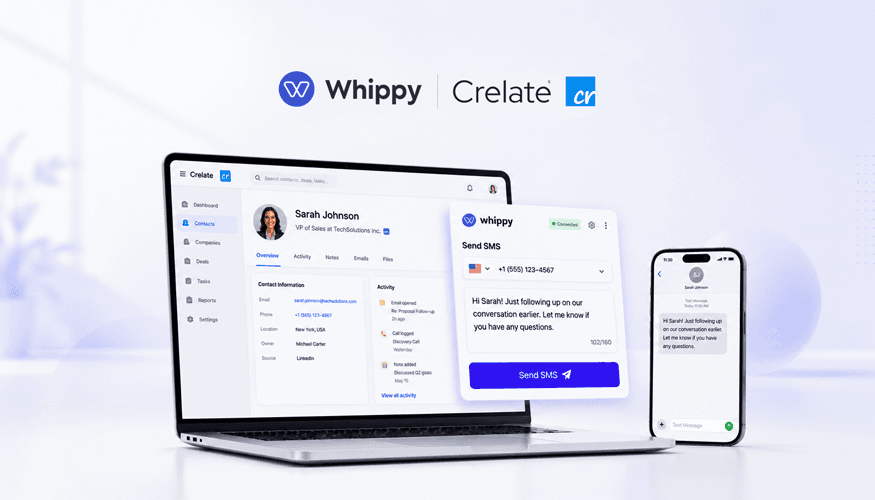
The Crelate Chrome Extension by Whippy is a browser add-on that embeds two-way SMS messaging directly inside the Crelate ATS. Recruiters can text candidates in Crelate, trigger automated message sequences by pipeline stage, send no-show reminders, and log every conversation to the candidate record, all without switching tabs or paying for a separate texting platform. It connects via the Crelate API and goes live in under five minutes.
If you're already using Crelate to manage your pipeline, this is the fastest way to add the one communication channel candidates actually answer.
Why Texting Beats Every Other Recruiting Channel
Before getting into how the extension works, it's worth understanding why Crelate SMS is worth adding at all.
SMS open rates sit at 98%, compared to roughly 20% for email (Forbes, 2025). More telling: 90% of text messages are read within three minutes of delivery (Validity, 2024). The average SMS response rate is 45%, versus 6% for email (Business.com, 2024). That is not a marginal difference. It is a different category of communication.
In recruiting, speed is currency. A candidate who applies at 9 a.m. and receives a text at 9:04 is a completely different conversation than one who receives an email at 2 p.m. The first candidate feels seen. The second one has already accepted another call.
That is the core problem Crelate texting solves, and why more recruiting teams are making ATS text messaging a primary channel rather than an afterthought.
What the Crelate Chrome Extension by Whippy Does
The Whippy Crelate Chrome Extension adds a fully functional SMS layer inside your existing Crelate interface. Here is exactly what it enables:
Text candidates in Crelate without leaving the ATS
Open any candidate profile and compose a message from right there. No copying phone numbers, no switching to a separate app, no logging back in later to record what you said. The entire conversation thread lives on the contact record, visible to every recruiter, coordinator, and hiring manager on the team.
You can send a single confirmation, drop in a scheduling link, or kick off a multi-step sequence. Every outbound message and inbound reply stays anchored to the candidate's record in Crelate.
Stage-based texting that fires automatically
This is where Crelate messaging gets genuinely powerful. Instead of relying on recruiters to remember to follow up, you map message sequences to pipeline stages. When a candidate moves to "Phone Screen," a confirmation goes out. When they hit "Interview Scheduled," they receive prep materials and logistics. When the day before the interview arrives, the automated no-show reminder fires without anyone touching a keyboard.
Recruiting SMS automation at the stage level means the most important touchpoints in your process never get dropped, regardless of how busy the team is or how many requisitions are open at once.
Automated no-show reminders that candidates actually read
Interview no-shows are one of the most expensive problems in high-volume recruiting. A confirmation email sent 24 hours before an interview has roughly a 20% chance of being opened before the interview time. A text message has a 98% open rate (Forbes, 2025).
Whippy's no-show reminders are triggered automatically when an interview is scheduled in Crelate. The candidate receives a confirmation with the time, location or video link, and a one-tap reply to confirm or reschedule. Agencies using this workflow report reducing no-shows by 35 to 40%, simply by switching the reminder channel.
A shared inbox for the entire recruiting team
When a candidate replies at 7 p.m. and their primary recruiter is offline, the message does not get buried in a personal inbox. It lands in a shared team inbox where any authorized team member can see the thread, review the history, and respond, with the full context (role, stage, previous messages, notes) right there.
This matters most in high-volume environments where candidates cycle through multiple hands: sourcer, recruiter, coordinator, onboarding. No handoff gaps, no "did we follow up?" moments, no candidates who fall through the cracks because one person was out sick.
How the Crelate SMS Integration Works (Technically)
The integration is built on the Crelate API and uses your API key to create a secure, real-time connection between Whippy's messaging infrastructure and your Crelate database.
When a message is sent or received:

It is immediately logged to the candidate's activity feed in Crelate
The phone number is matched to the correct contact record
The thread is tagged to the relevant requisition or job
When a pipeline stage changes in Crelate:
Whippy detects the trigger in real time
The assigned message sequence fires for that stage
All outbound and inbound messages are written back to the ATS record
Because the data flows through the Crelate API rather than a browser scrape or CSV sync, there are no delays, no duplicate records, and no manual exports required. Everything stays in your single system of record.
Setting Up the Crelate Chrome Extension: Step-by-Step
Getting started takes most teams fewer than five minutes.
Step 1: Install the Whippy Chrome Extension:
Add it from the Chrome Web Store. It appears as a lightweight overlay inside your existing Crelate browser interface, with no new tabs and no separate dashboard.
Step 2: Connect your Crelate account:
Navigate to Whippy's integration settings and paste your Crelate API key. This creates the secure real-time sync. Once connected, your candidate records, pipeline stages, and job data are immediately accessible from within the extension.
Step 3: Configure your sending preferences:
Set your outbound phone number(s), configure quiet hours (recommended: 8 a.m. to 8 p.m. local time), and select or build message templates. Templates pull in dynamic fields directly from Crelate, including candidate name, role title, interview time, and recruiter name, so every message feels personal without extra typing.
Step 4: Map stage-based sequences to your pipeline:
This is the high-value step. For each Crelate pipeline stage, Applied, Phone Screen Scheduled, Interview Confirmed, Offer Extended, assign an automated message or sequence. Decide which stages trigger immediate sends, which get a time delay, and which require a recruiter to review before sending.
Step 5: Run a test and go live:
Send a test message through a candidate profile, confirm it logs correctly to the activity feed, then activate the automation. Most teams are actively texting candidates within the same day they install.
Troubleshooting:
If messages are not logging to Crelate, verify the API key has not been rotated. If texts are not delivering, confirm your 10DLC registration is active. Whippy guides you through this during onboarding.
SMS Compliance Inside the Crelate Extension
Moving fast on candidate communication does not mean moving carelessly. Whippy's Crelate SMS integration is built with compliance as a foundation, not an afterthought.
Opt-in management is handled automatically. Candidates who have opted in to receiving SMS from your organization are flagged in the system; those who have not are protected from receiving automated texts until they do. STOP and HELP commands are honored immediately, and opt-out status syncs back to the Crelate record.
10DLC registration is the carrier-level verification that determines whether your texts reach inboxes. It is built into the Whippy onboarding process. Properly registered numbers experience dramatically lower carrier filtering, which directly improves deliverability and open rates.
Quiet hours are configurable at the account level. Set the times outside which no automated messages should be sent, and the system enforces it across all sequences, regardless of what timezone the recruiter is in when they set up an automation.
Audit trail: Every message sent or received is stored on the candidate record with a timestamp and sender attribution. This provides a clean compliance record for any audit, dispute, or internal review, which is especially useful for healthcare staffing and other regulated industries.
Done right, compliance infrastructure does not slow you down. It is what lets you run high-velocity SMS campaigns without worrying about deliverability erosion or candidate trust damage over time.
Real Results: What Teams Using Crelate Texting Report
A regional healthcare and light-industrial staffing agency implemented Whippy's Crelate SMS integration across their three-person recruiting team. The figures below reflect aggregated data collected over a 90-day period following activation, compared against the team's own baseline from the prior quarter. Their metrics before activation:
- First response to a new applicant: 8 to 12 hours
- Reply rate within 24 hours: 18%
- Interview no-show rate: 28%
After enabling stage-based texting and automated no-show reminders:
- First response: under 30 minutes (triggered automatically when candidates enter the Applied stage)
- Reply rate within 24 hours: 54%, a 3x increase
- No-show rate: reduced by 40%
The recruiter who led the rollout put it plainly: "We were losing candidates between application and first contact. Now the first touch happens automatically, and by the time I pick up the phone, they already know who we are and what the role is".
The operational gains were real, but so was the less quantifiable shift: candidates described feeling more respected and better informed, which improved referral rates and reduced the time-to-hire for roles that had historically been difficult to fill.
Who the Crelate Chrome Extension Is Built For
High-volume recruiting teams managing 20+ open requisitions benefit most from stage-based automation. The number of manual follow-ups it eliminates compounds quickly at scale.
Staffing agencies with multiple clients use Crelate texting to standardize candidate communication, ensuring every applicant receives the same professional experience regardless of which recruiter owns the role.
In-house recruiting teams at mid-sized companies use it to compete with larger employers on candidate experience. Fast responses, personal-feeling messages, and frictionless scheduling are no longer exclusive to teams with large headcounts.
Small businesses and solo recruiters get the same automation infrastructure as enterprise teams, because the templates and sequences do the heavy lifting. A two-person HR team can run the same quality touchpoint cadence as a 20-person recruiting department.
Crelate Texting vs. Other Communication Approaches
It is worth being direct about what the alternatives look like in practice.
Email only | Manual texting | Crelate Chrome Extension | |
|---|---|---|---|
Open rate | ~20% | N/A | 98% SMS |
Response rate | ~6% | Varies | ~45% SMS |
Logged to ATS | Yes | No | Yes, in real time |
Opt-out / compliance | Partial | None | Full (10DLC, STOP/HELP, audit trail) |
Stage-based automation | No | No | Yes |
Shared team visibility | Depends on tool | No | Yes |
Setup time | Existing | None | Under 5 minutes |
Sources: SMS open rate and email open rate: Forbes (2025). SMS vs. email response rate: Business.com.
The Whippy integration keeps messages, replies, stage history, notes, and scheduling links on a single contact record inside Crelate. That is the core architectural advantage: not just faster texting, but texting that makes your ATS data more complete and your team more coordinated.
Crelate Chrome Extension + Whippy's Full Recruiting Platform
The Chrome Extension is the fastest on-ramp into Whippy's broader recruiting automation platform. Teams that start with SMS frequently expand into:
Voice AI:
An AI recruiter that calls candidates immediately after they apply, screens them against job requirements, and logs structured notes back to Crelate without recruiter involvement.
Sequences:
Multi-channel outreach campaigns combining SMS, email, and voice touchpoints mapped to candidate journeys.
Shared team inbox:
A unified view of all candidate communications across channels, so nothing falls between shifts.
Campaign broadcasts:
SMS campaigns to large candidate pools for re-engagement, job alerts, or shift availability outreach.
Each capability integrates with the same Crelate data the Chrome Extension already connects to, so expanding does not require any additional setup on the ATS side.
Ready to Add SMS to Your Crelate Workflow?
The Crelate Chrome Extension by Whippy is the fastest way to add the communication channel candidates actually respond to, directly inside the ATS you already use.
Install in under five minutes. Connect your Crelate account. Set up your first stage-based sequence. Then watch what happens to your reply rates, no-show numbers, and time-to-first-touch.
Book a personalized demo
See exactly how stage-based texting, automated no-show reminders, and the shared recruiting inbox map to your specific workflow. The demo takes 30 minutes and covers setup, live configuration, and the automations most relevant to your team size and requisition volume.
Frequently Asked Questions About the Crelate Chrome Extension
Q: What is the Crelate Chrome Extension?
A: The Crelate Chrome Extension by Whippy is a browser add-on that adds two-way SMS messaging, automated message sequences, and no-show reminders directly inside the Crelate ATS. It connects via the Crelate API and runs inside your existing browser with no separate app required.
Q: How do I install the Crelate Chrome Extension?
A: Install it from the Chrome Web Store, then connect your Crelate account using an API key in Whippy's integration settings. From there, configure your sending numbers, templates, and stage-based sequences. Most teams are live and sending the same day.
Q: Does the Crelate Chrome Extension support automated texting?
A: Yes. Stage-based texting lets you assign automated message sequences to any pipeline stage in Crelate. When a candidate moves to that stage, the sequence fires automatically with no manual action required from the recruiter.
Q: Can I send no-show reminders through Crelate?
A: Yes. Interview reminders are one of the most commonly configured automations. When an interview is scheduled in Crelate, Whippy automatically sends a confirmation text, a reminder the evening before, and a day-of check-in, all logged to the candidate record.
Q: Is the Crelate Chrome Extension compliant with SMS regulations?
A: Yes. Whippy handles opt-in management, STOP/HELP command enforcement, quiet hours configuration, and 10DLC registration guidance. Every message is logged with a timestamp and sender attribution on the Crelate record, providing a full audit trail.
Q: Does Crelate support texting natively?
A: Crelate is your system of record for candidate data, pipeline management, and recruiting workflows. It does not include native two-way SMS. The Whippy Chrome Extension adds Crelate SMS integration so you can text candidates directly from the ATS with full automation and compliance support.
Q: How quickly can candidates receive a text after applying?
A: With stage-based automation enabled, a candidate can receive a first-touch text within seconds of being added to the Applied stage in Crelate, before any recruiter has manually reviewed the application.
Q: Will this work alongside my existing email campaigns?
A: Yes, and it is designed to. Use email for rich content such as offer letters, detailed instructions, and longer updates. Use Crelate texting for high-speed checkpoints: application acknowledgments, scheduling links, reminders, and quick confirmations. Both channels log to the same contact record, giving you a complete communication history.
Whippy is the AI-powered recruiting automation platform trusted by staffing agencies and in-house teams across healthcare, light industrial, professional services, and more. See all integrations.
Table of Contents
Table of Contents
- Why Texting Beats Every Other Recruiting Channel
- What the Crelate Chrome Extension by Whippy Does
- How the Crelate SMS Integration Works (Technically)
- Setting Up the Crelate Chrome Extension: Step-by-Step
- SMS Compliance Inside the Crelate Extension
- Real Results: What Teams Using Crelate Texting Report
- Who the Crelate Chrome Extension Is Built For
- Crelate Chrome Extension + Whippy's Full Recruiting Platform
- Ready to Add SMS to Your Crelate Workflow?
- Frequently Asked Questions About the Crelate Chrome Extension
Try Whippy for Your Team
Experience how fast, automated communication drives growth.

Related Articles

Best AI Recruiting Tools for Franchise Staffing
 Elizabeth Long
The Staffing Operating System for Avionté
Elizabeth Long
Automated License Verification for Staffing Agencies
Elizabeth Long
Write Job Descriptions That Make AI Recruiters Perform
Elizabeth Long
The Candidates You Need Are Already in Your ATS
Elizabeth Long
Payroll Communication for Staffing Agencies
Elizabeth Long