


Table of Contents
- The Hidden Cost of Employee No-Shows
- What Are Automated Shift Reminders and How Do They Work?
- Benefits of Automated Shift Reminders
- Why Automated Shift Reminders Reduce Employee No-Shows
- How an Automated Shift Reminder Workflow Works
- Types of Automated Shift Reminders
- SMS vs Email for Shift Reminders
- The Power of Two-Way Shift Confirmations
- AI-Powered Shift Reminders for High-Volume Staffing Teams
- Business Impact of Automated Shift Reminders
- Beyond Shift Reminders: Assignment Check-Ins
- See Automated Shift Reminders in Action
- FAQs About Automated Shift Reminders
Try Whippy for Your Team
Experience how fast, automated communication drives growth.
In staffing, reliability is everything. A single missed shift can trigger a cascade of problems: uncovered roles, frustrated clients, last-minute scrambles for replacements, and lost billable hours. When teams manage dozens or hundreds of active assignments, small communication gaps quickly become operational risk.
This is why Automated Shift Reminders have become a core part of modern workforce operations, helping organizations ensure consistency in attendance communication and shift coordination.
Instead of relying on manual follow-ups, organizations now use Automated Shift Notifications, SMS confirmations, and AI-driven workflows to ensure employees confirm their attendance before a shift begins.
An intelligent reminder system does more than send a message. It creates a structured confirmation loop that verifies attendance early, flags risk when responses are missing, and gives coordinators time to intervene. Combined with AI-powered shift reminders, automated messaging, and two-way confirmations, this approach dramatically improves staffing reliability.
For staffing agencies, healthcare providers, and field service teams, the result is simple: fewer missed shifts, less manual chasing, and more predictable operations.
The Hidden Cost of Employee No-Shows
In high-volume staffing environments, a missed shift rarely affects only one role. A single absence can disrupt scheduling, client coverage, and operational planning.
Common consequences include:

uncovered positions
last-minute backfill efforts
frustrated client contacts
lost billable hours
For staffing firms operating at scale, even a small percentage of missed shifts can translate into significant operational and financial impact. When attendance issues are discovered only at shift start time, recruiters and coordinators have very little room to react.
This is why many organizations implement Automated Shift Reminders as part of their workforce communication strategy. By confirming attendance early, teams gain the time needed to intervene, adjust coverage, and maintain operational continuity.
What Are Automated Shift Reminders and How Do They Work?
Automated shift reminders are scheduled notifications sent to employees before a shift to confirm attendance and prevent no-shows. These reminders typically include the shift start time, work location, and a simple confirmation request. Modern systems use SMS reminders, automated follow-ups, and two-way confirmations to verify attendance before coverage is at risk.
An effective shift reminder system turns these notifications into a reliable attendance verification workflow and becomes an essential part of the broader scheduling process used by operations teams and shift managers.
Instead of sending one message and hoping for a response, modern platforms combine several capabilities:
• Automated schedule reminders sent before a shift
• A confirmation request within the message
• Two-way SMS shift confirmation
• Escalation workflows if no response is received
• Alerts to recruiters or coordinators when shifts remain unconfirmed
Because text messages are fast and easy to respond to, many organizations rely on SMS shift reminders or text message shift reminders rather than email alone. While email shift reminders still play a role, SMS provides significantly higher response rates.
By introducing shift reminder automation, organizations replace inconsistent manual outreach with a structured confirmation process that strengthens workforce reliability while simplifying the process of managing shifts across large teams.
Benefits of Automated Shift Reminders
Automated Shift Reminders help organizations maintain reliable staffing coverage by verifying employee availability before a shift begins. Instead of relying on manual calls or last-minute follow-ups, automated reminder workflows ensure workers acknowledge their assignments in advance.
Key benefits include:

Earlier visibility into potential attendance issues
More reliable shift coverage across large staffing operations
Less manual outreach for recruiters and shift managers
Better workforce visibility with real-time confirmation tracking
Improved operational consistency across the scheduling process
By automating shift confirmations and follow-ups, organizations can identify attendance risks earlier and respond before shifts are affected.
Why Automated Shift Reminders Reduce Employee No-Shows
Employee no-shows rarely happen without warning. Most attendance issues begin with miscommunication, schedule confusion, or competing commitments. Without a structured reminder system, these signals remain invisible until the shift begins.
Automated workforce communication changes that dynamic by introducing automated attendance reminders and proactive notifications that surface potential issues before shifts begin.
When employees receive shift reminders before a shift, they are prompted to actively confirm their attendance. This small step creates an early feedback loop that helps teams detect issues before they escalate.
Automated reminders help teams:
• Prevent employee no-shows by confirming attendance in advance
• Identify scheduling conflicts before the shift begins
• Reduce last-minute call-offs and confusion about work locations
• Enable staff no-show reduction through proactive follow-up
Organizations that implement No-show prevention automation often see a dramatic improvement in attendance reliability. Instead of discovering problems after coverage fails, operations teams receive early signals that allow them to act quickly and reduce shift no-shows.
This proactive approach turns reminders into a key part of employee attendance automation.
How an Automated Shift Reminder Workflow Works
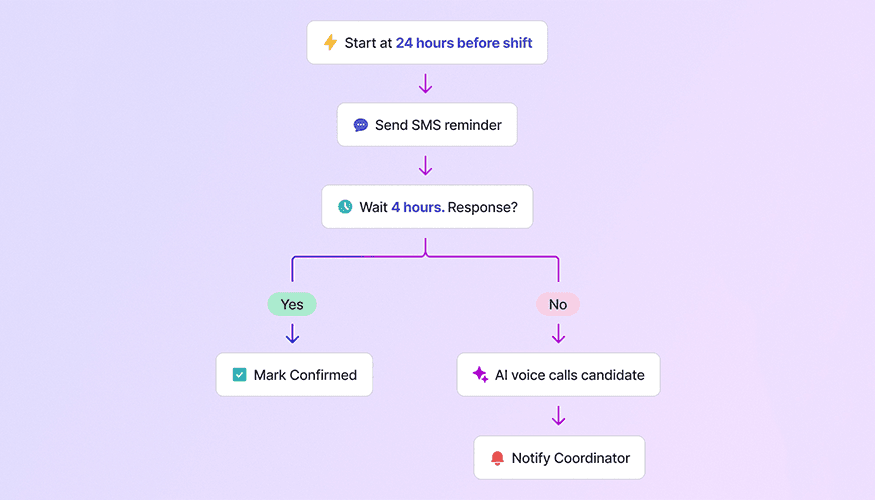
Modern staffing operations rely on a confirmation loop that verifies attendance before a shift begins. Instead of sending a single message, an automated shift reminder system uses several coordinated steps to ensure workers confirm their availability and teams can detect potential coverage risks early.
A typical automated shift reminder system follows this workflow:
1. Start Before the Shift
Most organizations begin automated schedule reminders or automatic shift reminders about 24 hours before a shift. Some also add a shorter reminder window two hours before start time.
These work schedule reminders ensure employees clearly understand:
• Shift start time
• Work location
• Assignment details
This is especially useful for first day shift reminders, where workers may still be learning a new job site.
2. Send an SMS Reminder
The system sends a message containing key information and a simple confirmation request.
Example message:
Hi John, this is ABC Staffing. Your shift at Northside Warehouse starts tomorrow at 7:00 AM at 221 Market St. Reply YES to confirm your attendance.
This message acts as both a reminder and a shift confirmation message, allowing workers to quickly acknowledge the assignment.
Many organizations rely on workforce SMS automation to deliver these reminders because SMS messages are read almost instantly.
3. Wait for Confirmation
After the reminder is sent, the system monitors responses. Workers confirm their attendance using a simple reply, which triggers shift acknowledgement and shift attendance confirmation within the platform.
This process supports several attendance monitoring capabilities, including shift attendance reminders and real-time confirmation tracking:
• employee shift attendance tracking
• automated shift attendance tracking
• real-time confirmation visibility
This step forms the core of the shift attendance confirmation process.
4. Detect Missing Responses
If the worker does not respond within the expected window, the system automatically escalates.
This may include:
• Additional automated SMS notifications
• AI-based follow-ups
• notifications to coordinators or recruiters
By identifying unconfirmed shifts early, organizations gain time to adjust staffing plans and prevent disruptions.
5. AI Follow-Ups and Escalation
Advanced systems introduce AI into the workflow. An AI shift reminder system can trigger follow-ups through additional messages or automated voice calls.
These automated follow-ups allow organizations to:
• send additional reminders automatically
• trigger Conversational confirmations
• confirm worker intent when SMS responses are missing
In high-volume environments, AI-powered shift reminders dramatically reduce manual outreach and improve coverage reliability.
Types of Automated Shift Reminders
Different assignments require different reminder strategies, particularly for organizations managing shifts across multiple locations or staffing environments. Organizations often use a mix of reminder types to support various scheduling scenarios.
First Day Shift Reminders
These reminders ensure workers clearly understand the location and start time of a new assignment. First day shift reminders help eliminate confusion and reduce early attendance issues.
Recurring Shift Reminders
For long-term placements, recurring shift reminders reinforce attendance expectations and maintain consistent coverage.
Rotating Shift Reminders
Industries with changing schedules rely on rotating shift reminders to ensure employees stay informed when assignments vary week to week.
On-Call Shift Reminders
Healthcare and service industries often use on-call shift reminders to confirm availability when staff may be required at short notice.
Client Shift Reminders
Staffing agencies may send client shift reminders to ensure workers clearly understand which client location they are scheduled to support.
Together, these reminder types create a flexible shift notification system capable of supporting multiple workforce scenarios.
SMS vs Email for Shift Reminders
Both email and text messaging can deliver reminders, but they serve different purposes.
Email is useful for detailed communication, while SMS shift reminders excel at speed and response rates.
SMS messages often achieve open rates close to 98%, while email averages around 20–30%, and nearly 90% of text messages are read within three minutes of delivery. Because workers can read and respond instantly, SMS creates a faster and more reliable confirmation loop for shift reminders.
Text messaging enables organizations to:
send shift reminders automatically
request quick confirmations
support Two-way confirmations
capture responses in real time
Because employees can respond immediately, text message reminders for shifts are often the preferred channel for confirmations.
Combining SMS with email shift reminders creates a layered communication approach that ensures messages reach workers reliably.
The Power of Two-Way Shift Confirmations
A reminder alone does not guarantee attendance. The most effective systems require employees to confirm their shifts directly.
With two-way shift confirmations, workers respond to reminder messages to verify attendance. The system records their response and updates assignment status automatically.
This creates a clear shift confirmation notification process that recruiters and coordinators can monitor.
Using Two-way SMS shift confirmation, organizations gain instant visibility into workforce readiness while maintaining a simple experience for employees.
AI-Powered Shift Reminders for High-Volume Staffing Teams
Organizations managing large numbers of assignments benefit most from automation.
In high-volume staffing automation, recruiters cannot manually follow up with every worker before each shift. Automated systems solve this by combining messaging, confirmations, and AI escalation.
An Intelligent shift notification system can:
• send automated shift reminders at scheduled intervals
• monitor responses automatically
• escalate when shifts remain unconfirmed
• alert coordinators to potential coverage issues
This creates a scalable shift scheduling automation process within a modern scheduling platform, helping teams maintain reliability without increasing manual workload.
Business Impact of Automated Shift Reminders
Organizations that implement shift reminder software often see measurable operational improvements, especially for staffing teams coordinating staffing shift reminders across multiple assignments.
Key benefits include:
Fewer missed shifts: Automated reminders reinforce shift details and prompt workers to confirm attendance early.
Reduced manual outreach: Recruiters spend less time calling workers to confirm assignments.
Better workforce visibility: Operations teams can track employee shift attendance and identify potential coverage risks sooner.
More reliable coverage: Early confirmations give teams time to adjust schedules and maintain staffing levels.
Over time, these improvements lead to more predictable operations and stronger client relationships.
Beyond Shift Reminders:
Assignment Check-Ins
Automated shift reminders protect immediate coverage by confirming that workers will attend their scheduled shifts. But once an assignment begins, staffing teams also need visibility into the worker’s experience and any potential issues that could affect retention.
This workflow is part of a broader staffing automation strategy, which you can explore in our Staffing Workflow Automation Use Cases guide.
This is where assignment check-ins come in. These automated follow-ups are typically sent after the first shift or early in an assignment to ask workers how the placement is going and whether any problems need attention.
While Automated Shift Reminders reduce no-shows and protect shift coverage, assignment check-ins help staffing teams detect issues early and improve long-term placement stability.
Learn more in our guide to Assignment Check-Ins for Staffing Teams.
See Automated Shift Reminders in Action
Modern staffing operations depend on reliable communication. Automated reminders, AI follow-ups, and confirmation workflows help organizations maintain coverage without constant manual intervention.
Platforms like Whippy make it possible to automate employee shift notifications text messaging, track confirmations, and manage attendance across large teams with ease.
If you want to see how Automated Shift Reminders and intelligent workforce messaging can help your organization reduce no-shows and improve coverage reliability, you can explore how the workflow operates in practice.
Staffing teams using automated shift reminders often see immediate improvements in attendance reliability and operational visibility.
Request a Demo ↗
FAQs About Automated Shift Reminders
Q: What are automated shift reminders?
A: Automated shift reminders are scheduled notifications sent to employees before a shift to confirm attendance and prevent no-shows. These employee shift reminders typically include the shift start time, work location, and a simple confirmation request so workers can quickly acknowledge their assignment.
Q: How do automated shift reminders reduce employee no-shows?
A: Automated shift reminders reduce no-shows by prompting workers to confirm their attendance before a shift begins. If an employee does not confirm, the system can trigger follow-ups or alert coordinators so teams can identify attendance risks early and take action before coverage is affected.
Q: When should shift reminders be sent?
A: Most organizations send automated shift reminders about 24 hours before a shift and again a few hours before the start time. This timing allows employees to review shift details, confirm their availability, and helps staffing teams detect potential scheduling conflicts before the shift begins. If a schedule update occurs, automated reminders can be triggered again so employees receive the most current shift information.
Q: Why are SMS shift reminders more effective than email?
A: SMS shift reminders typically achieve much higher open and response rates than email. Because employees receive text messages instantly on their phones, they can read the reminder and confirm their attendance within minutes, creating a faster and more reliable confirmation loop for shift coverage.
Q: What information should a shift reminder include?
A: A shift reminder message should clearly include the company name, shift start time, work location, and a simple confirmation request such as replying “YES” to confirm attendance. Clear and concise messages make it easier for workers to acknowledge their assignments quickly and reduce scheduling misunderstandings.
Q: Can automated shift reminders work for recurring or rotating schedules?
A: Yes. Automated shift reminders can be configured for recurring assignments, rotating schedules, on-call shifts, or first-day placements. Automated scheduling systems can send reminders automatically based on the assignment type, ensuring employees receive the right notifications at the right time.
Table of Contents
Table of Contents
- The Hidden Cost of Employee No-Shows
- What Are Automated Shift Reminders and How Do They Work?
- Benefits of Automated Shift Reminders
- Why Automated Shift Reminders Reduce Employee No-Shows
- How an Automated Shift Reminder Workflow Works
- Types of Automated Shift Reminders
- SMS vs Email for Shift Reminders
- The Power of Two-Way Shift Confirmations
- AI-Powered Shift Reminders for High-Volume Staffing Teams
- Business Impact of Automated Shift Reminders
- Beyond Shift Reminders: Assignment Check-Ins
- See Automated Shift Reminders in Action
- FAQs About Automated Shift Reminders
Try Whippy for Your Team
Experience how fast, automated communication drives growth.

Related Articles
Best AI Recruiting Tools for Franchise Staffing
 Elizabeth Long
The Staffing Operating System for Avionté
Elizabeth Long
Automated License Verification for Staffing Agencies
Elizabeth Long
Write Job Descriptions That Make AI Recruiters Perform
Elizabeth Long
The Candidates You Need Are Already in Your ATS
Elizabeth Long
Payroll Communication for Staffing Agencies
Elizabeth Long