


Table of Contents
- What Is Candidate Inquiry Automation?
- Why Recruiting Teams Can't Keep Up Manually
- How to Automate Candidate Inquiries Using AI
- The Complete Automated Recruiting Workflow
- Benefits of Automating Candidate Communication
- AI for Candidate Inquiries vs. Traditional Approaches
- What to Look for in a Recruiting Automation Platform
- Start Automating Candidate Inquiries Today
- FAQs About Candidate Inquiry Automation
Try Whippy for Your Team
Experience how fast, automated communication drives growth.
Every recruiter knows the feeling. It's 9 a.m. on a Monday, and the phone is already ringing. A job seeker wants to know how to apply. An applicant is asking about pay. Someone else wants to know which office to visit. By the time you've answered three calls, you've lost thirty minutes you needed for actual hiring work.
This is the hidden cost of candidate communication, not the hard work of interviewing and placing talent, but the constant, repetitive, low-complexity inquiries that eat hours and slow everything down.
The good news: you don't have to answer these manually anymore. With the right recruiting automation software and recruitment automation tools, you can automate recruiting with AI end to end, handling inbound calls, automating job applicant inquiries, and routing every interaction automatically until a qualified applicant lands in your ATS.
This guide covers exactly how it works, what to automate, and why the teams doing it first are pulling ahead.
What Is Candidate Inquiry Automation?
Candidate inquiry automation is the process of using AI to handle inbound questions, calls, and requests from job seekers and applicants, without requiring a recruiter to pick up the phone or respond manually.
At its core, it means your recruiting operation can deliver instant answers for job applicants and a real time candidate response at any hour, through conversational AI recruiting that automates hiring communication, handles routine calls, and routes every inquiry without human intervention.
This is different from a traditional IVR (press 1 for this, press 2 for that). Learn how modern AI answering services work. Automated call handling for staffing agencies and recruiting teams means the system understands natural language, not just button presses. It can respond to "I'm looking for a warehouse job near Holland" the same way a human would, not by routing blindly, but by understanding intent and responding accordingly.
It's an always-on, always-accurate front line for your recruiting operation, one that never transfers a call to the wrong person or puts a candidate on hold.
Why Recruiting Teams Can't Keep Up Manually
Before getting into how to automate candidate inquiries, it's worth understanding why manual handling is breaking down.
The volume is simply unsustainable. A mid-sized staffing agency fielding hundreds of applicants a month will receive dozens of inbound calls that have nothing to do with high-value recruiting decisions. See how high-volume teams handle this. Without inbound recruiting call automation, that volume lands directly on staff. Without candidate call handling automation, it stays there.
Questions like:
- What are your office hours?
- How do I apply for a job?
- Where is the Grand Rapids location?
- When do I get paid?
- What benefits do I have?
- How do I request time off?
These are answerable. They are not hard. But when they land on a recruiter's desk, they displace the work that actually builds a business.
The result is recruiter burnout, slower response times for serious candidates, and a candidate experience that feels impersonal and inconsistent. When you reduce inbound recruiting calls by handling routine inquiries automatically, you don't just save time, you make your entire pipeline faster and more competitive.
How to Automate Candidate Inquiries Using AI
Automating candidate inquiries isn't a single tool or a single switch. It's a system with several interconnected layers. Here is how it works in practice.
1. Build Your AI Knowledge Base
AI FAQ automation is the foundation of any candidate inquiry automation system. This is where AI for recruiting communication draws its answers from, and the richer it is, the better your AI recruiting assistant performs.
A strong knowledge base for recruiting can include:
- Custom FAQ lists (office hours, locations, pay schedules)
- Uploaded policy documents and internal guides
- Text-based knowledge articles
- Your full Employee Handbook
- Your careers page and job board website
When a candidate calls and asks "What's the minimum pay for warehouse work?" the AI doesn't guess. It pulls the answer directly from your configured knowledge base and delivers it instantly.
The key advantage of knowledge base automation for recruiting is that it's dynamic. If a new policy takes effect, or candidates keep asking something you haven't covered yet, you add it once, and the AI begins answering it immediately, at scale, across every channel.
This is what makes a true AI knowledge base for recruiting different from a static FAQ page. It's live, flexible, and learns from what your candidates actually need to know.
2. Automate Inbound Recruiting Calls
Understanding how to automate recruiting calls starts with recognizing where the friction lives. The phone is the highest-friction touchpoint in most recruiting operations. Candidates call. Staff answer. Callers get transferred. Recruiters get pulled off other work.
With a voice AI recruiting system, inbound calls are handled automatically from the first ring. The AI acts as a virtual receptionist for recruiters, greeting callers, understanding what they need, automating candidate routing, and responding with the right information or action.
For job seekers, a typical automated call flow might look like this:
- Caller says they're looking for work
- AI identifies the inquiry type
- AI asks a brief qualifying question (availability, type of work, minimum pay)
- AI sends a tracked SMS link to your job board
- Caller is invited to apply directly or transfer to a specific office or recruiter
This is job applicant call routing at its most efficient. No hold music. No transfers to the wrong person. No recruiter time spent on a call that didn't need them.
For non-application inquiries (operational and HR questions) the AI answers directly, without escalation, using your knowledge base. This covers the majority of inbound call volume for most recruiting teams.
The result is dramatically reduced inbound recruiting calls reaching your staff, while every caller still gets a fast, accurate, professional response.
3. Capture Candidate Intake Data Automatically
One of the most valuable (and underused) features of automated candidate inquiry systems is lightweight candidate screening automation. This is automated candidate screening at its most practical: not complex scoring models, but structured data capture that gives recruiters a head start.
Before routing a caller, the AI can ask a few quick questions and capture structured data:
- Name and phone number
- Availability (days, shifts, start date)
- Minimum acceptable pay
- Type of work sought
- Preferred location or office
This candidate intake automation, the same applicant intake automation that feeds your ATS downstream, turns every inbound interaction into a data point. Instead of callers disappearing after a conversation, their information is captured, organized, and ready to act on.
For recruiting teams managing high application volumes, this changes the entire economics of inbound calls. What used to be a time drain becomes a structured pipeline entry.
4. Send Automated SMS Follow-Ups
Once a job seeker inquiry has been handled by the AI, the conversation doesn't have to end there. SMS recruiting automation extends engagement beyond the call, automatically, without recruiter involvement.
The system can automatically:
- Send a tracked SMS link to your job board or careers page
- Follow up if the link wasn't opened
- Confirm application receipt once submitted
- Notify the candidate of next steps
Tracking whether the SMS link was opened lets you track candidate engagement via SMS in real time, visibility into follow-through that a verbal conversation alone can never provide. This is automated SMS for recruiting and candidate follow-up automation running together, without anyone on your team lifting a finger.
5. Connect to Your ATS and Trigger Recruiter Workflows
The final piece of end-to-end candidate inquiry automation is the handoff to your ATS.
When a candidate applies after receiving an SMS link, applicant tracking system automation takes over. Candidate records are created, alerts are sent, and recruiting CRM automation ensures the right recruiter is notified, all without manual entry or follow-up.
This ATS integration for recruiting automation closes the loop between the first inbound inquiry and a qualified candidate entering your pipeline. It's the difference between a system that handles calls and a system that actually drives placements.
Whippy's platform is built to connect these layers, voice, SMS, knowledge base, intake, and ATS, into a single cohesive recruiting workflow automation system.
The Complete Automated Recruiting Workflow
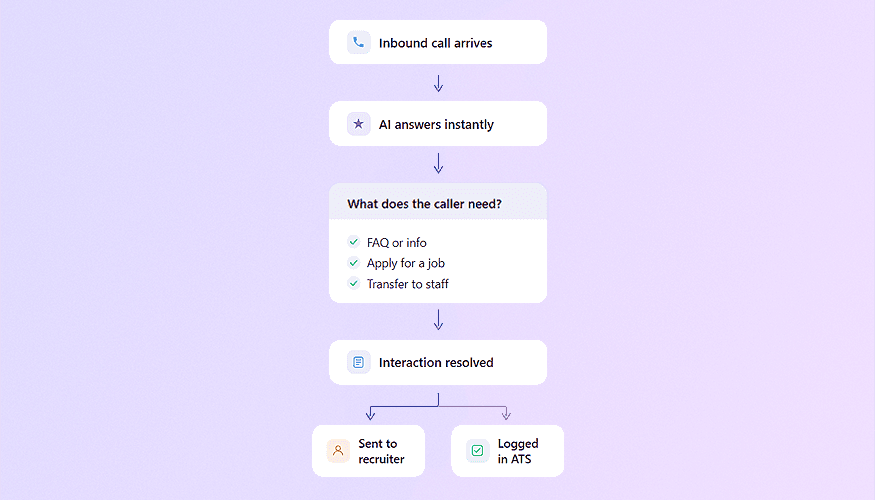
To make this concrete, here is what an end-to-end candidate inquiry automation flow looks like in practice:
Step 1: Candidate calls your recruiting line at 7 p.m. on a Thursday.
Step 2: The AI voice assistant for hiring answers immediately. No voicemail. No waiting until morning.
Step 3: The caller says they're looking for dispatcher work. The AI identifies this as a job seeker inquiry.
Step 4: The AI asks two brief intake questions: availability and minimum pay. The candidate answers conversationally.
Step 5: The AI sends a tracked SMS link to your dispatcher job listings.
Step 6: The candidate opens the link and applies within 20 minutes.
Step 7: Your ATS receives the application and automatically creates a candidate record and triggers the recruiter workflow.
Step 8: The next morning, a recruiter opens their queue and finds a pre-qualified applicant, name, phone, availability, pay expectation, and application already captured.
That is what a fully automated recruiting workflow delivers. By the time a recruiter sees this candidate, the intake is done, the data is captured, and the conversation can start where it matters.
Benefits of Automating Candidate Communication
The business case for candidate inquiry automation is straightforward, but the full picture is worth spelling out.

Recruiter time recovered. When you automate candidate questions, recruiters stop being switchboard operators. They spend their time on interviews, placements, and relationships, the work that actually generates revenue.
24/7 candidate support. Candidates don't only call during business hours. An AI system that operates around the clock means no inquiry goes unanswered, no matter when it arrives. This is especially valuable for staffing agencies managing shift workers who are active outside of 9-to-5.
Faster candidate response time. Speed matters in recruiting. Candidates who apply to multiple opportunities respond to whoever contacts them first. An AI system that replies within seconds (not hours) gives your operation a real competitive edge.
Automated candidate engagement at every touchpoint. Candidate engagement automation and candidate communication automation work together to ensure no inquiry falls through the cracks, not the first call, not the SMS follow-up, not the application confirmation. Every interaction is logged, tracked, and acted on without a recruiter managing it manually.
Consistent, accurate information. When 10 candidates ask the same question, they get the same correct answer, not whatever the available staff member happened to say. Automated candidate communication eliminates information drift across branches and offices.
Improved candidate experience. A candidate who gets an immediate, helpful response (even from an AI) has a better impression of your organization than one who sits on hold or gets a voicemail. This matters for employer brand and candidate retention.
Scalable operations. Whether you're handling 50 inquiries a month or 5,000, the AI system scales without adding headcount. This is what makes AI tools for recruiting teams genuinely transformative for growth-stage operations.
Structured data from every interaction. Every call, every response, every SMS open becomes a data point. Over time, this gives recruiting leaders real visibility into inquiry volume, common questions, candidate behavior, and pipeline velocity.
AI for Candidate Inquiries vs. Traditional Approaches
It's worth comparing automated systems against the alternatives your team might currently rely on.
Traditional IVR (press 1, press 2): Candidates find these frustrating and impersonal. They can't handle natural language or unexpected questions, and they offer no data capture.
Dedicated receptionist staff: Expensive, limited to business hours, inconsistent across individuals, and unavailable during peaks.
Recruiters handling inbound calls directly: Highest quality, but also highest cost per interaction. This is the arrangement that most drains recruiter capacity.
An AI answering service for recruiting handles what the other options can't: natural language, 24/7 availability, consistent accuracy, intake capture, and seamless handoff to your recruiting pipeline, at a fraction of the cost of human handling.
This isn't about replacing human recruiters. It's about making sure human recruiters are doing human work.
What to Look for in a Recruiting Automation Platform
If you're evaluating an AI solution for staffing agencies or in-house recruiting teams, here are the capabilities that matter most:
Knowledge base flexibility. Can you load documents, websites, and custom FAQs? Can you update them instantly? A rigid system that requires IT support to update answers isn't practical for recruiting.
Natural language voice capability. Does the system understand conversational speech, including partial answers, corrections, and follow-up questions? This is what separates a real AI voice assistant for hiring from a basic phone menu.
SMS integration and AI for recruiting communication. Can the system send tracked links and follow-up messages automatically? Can it handle multi-step candidate conversations across channels? This is essential for job applicant call routing that actually converts.
Intake capture. Does the system capture candidate data during the call and store it in a usable format?
ATS integration. Does it connect to your existing applicant tracking system? Standalone tools that don't feed your ATS create manual work downstream.
Analytics and visibility. Can you see call volumes, common questions, SMS open rates, and conversion data? You can't improve what you can't measure.
Whippy is built specifically for recruiting and staffing operations, combining voice AI, SMS automation, knowledge base management, intake capture, and ATS integration into a single platform designed to automate candidate inquiries from the first ring to the final handoff. For a broader look at how AI agents are used across staffing workflows, see the full use case guide.
Start Automating Candidate Inquiries Today
The recruiting teams pulling ahead are not doing more work. They have built systems that handle the volume so their people don't have to.
Automating candidate inquiries isn't a future capability, it's available today, and the gap between teams that use it and teams that don't is widening every month. Every call answered automatically is a recruiter saved for the work that matters. Every candidate who gets an instant response is a placement that doesn't slip away.
The fastest way to understand it is to watch it in action.
Request a Demo
See exactly how it handles your call volume, your questions, and your ATS, applied to your operation, not a generic demo.
FAQs About Candidate Inquiry Automation
Q: What is candidate inquiry automation?
A: Candidate inquiry automation is the use of AI to handle inbound questions, calls, and requests from job seekers and applicants automatically, without requiring recruiter involvement for routine interactions.
Q: How does candidate inquiry automation work?
A: It works through a combination of AI voice recognition, a knowledge base of your company's information, pre-configured routing flows, and integrations with SMS and your ATS. When a candidate contacts your organization, the AI identifies their need, responds with relevant information or a follow-up action, captures intake data if relevant, and hands off to your ATS when an application is submitted.
Q: How to automate candidate inquiries step by step?
A: Start by building your knowledge base with the information candidates most commonly request. Then configure your call routing flows for job seekers and applicants. Add SMS automation for follow-up after inquiry. Connect to your ATS so applications trigger recruiter workflows automatically.
Q: How to handle applicant calls automatically?
A: Using a voice AI recruiting system that understands natural language, you can route, respond to, and capture data from applicant calls without a human on the line. The system handles common questions directly and escalates only what truly requires a recruiter.
Q: How to answer candidate questions without recruiters?
A: By powering an AI recruiting chatbot or voice assistant with your knowledge base (including FAQs, policies, job information, and location details) you can answer the vast majority of candidate questions instantly and accurately without recruiter involvement.
Q: What are the benefits of automating candidate communication?
A: Reduced recruiter workload, faster candidate response times, 24/7 candidate support, consistent information across all touchpoints, structured intake data, and a better overall candidate experience.
Q: Why automate candidate inquiries?
A: Because the volume of routine inquiries overwhelms recruiting teams and displaces the high-value work that drives placements. Automating these interactions recovers recruiter time, accelerates candidate response, and scales your operation without adding headcount.
Q: Is AI candidate screening accurate?
A: When configured with well-structured intake questions and clear criteria, AI candidate screening is highly consistent and objective. It captures the same data from every candidate without variation, fatigue, or bias.
Q: How to reduce inbound recruiting calls reaching staff?
A: By implementing an AI phone system for recruiting that handles common inquiries automatically (answering FAQs, routing job seekers, capturing intake data) you can substantially reduce the volume of calls that require human attention.
Table of Contents
Table of Contents
- What Is Candidate Inquiry Automation?
- Why Recruiting Teams Can't Keep Up Manually
- How to Automate Candidate Inquiries Using AI
- The Complete Automated Recruiting Workflow
- Benefits of Automating Candidate Communication
- AI for Candidate Inquiries vs. Traditional Approaches
- What to Look for in a Recruiting Automation Platform
- Start Automating Candidate Inquiries Today
- FAQs About Candidate Inquiry Automation
Try Whippy for Your Team
Experience how fast, automated communication drives growth.

Related Articles
EU AI Act: Whippy's Independent Bias Audit
 Elizabeth Long
Colorado SB 26-189: Whippy's Independent Bias Audit
Elizabeth Long
NYC Local Law 144: Whippy's Independent Bias Audit
Elizabeth Long
California FEHA: Whippy's Independent Bias Audit
Elizabeth Long
Illinois HB 3773: Whippy's Independent Bias Audit
Elizabeth Long
Best AI Recruiting Tools for Franchise Staffing
Elizabeth Long