AI Agents Use Cases for Staffing
Table of Contents
- One platform. Every stage of the staffing lifecycle.
- 1. Client Job Order Intake
- 2. Sales Outreach
- 3. Search & Match
- 4. AI Recruiter
- 5. Reference Checks
- 6. Onboarding Coordination
- 7. Assignment Confirmations
- 8. Assignment Check-ins
- 9. Survey & NPS
- 10. Redeployment & Reactivation
- 11. Receptionist
- 11a. FAQs
- 11b. Call-Offs
- 11c. Payroll Verification
- The bottom line
Try Whippy for Your Team
Experience how fast, automated communication drives growth.
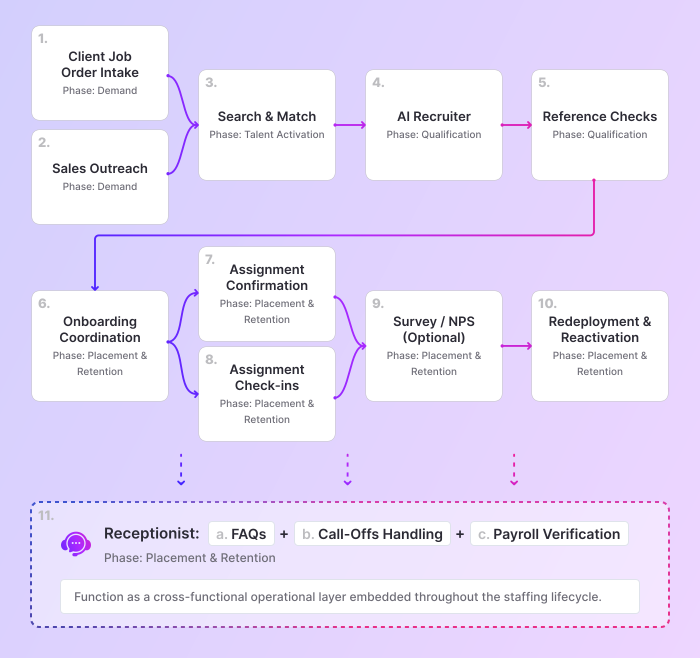
One platform. Every stage of the staffing lifecycle.
Most staffing firms don’t lose deals because of bad recruiters.
They lose because they respond too slowly.
A job order comes in after hours and sits in voicemail.
A candidate applies and waits 24 hours for a response.
A shift goes unconfirmed until the client calls asking where the worker is.
By the time your team reacts, the revenue is already gone.
In staffing, slow equals lost. Every time.
This is not a recruiting problem.
It is an infrastructure problem.
And the gap is massive.
Firms that move from manual workflows to structured AI systems:
- Reduce response times from 48 hours to under 5 minutes
- Increase completed screenings from 17% to over 80%
(Staffing Firm Saves $1M with AI Recruiting)
That is not optimization. That is a different operating model.
Most staffing firms try to fix this by adding more tools:
- A tool for screening
- A tool for outreach
- A tool for onboarding
But more tools do not fix the system. They fragment it.
And fragmentation is what slows everything down:
- Missed job orders
- Delayed follow-ups
- Inconsistent execution across branches
The takeaway is simple:
You do not need more AI tools.
You need one system that runs your entire staffing operation.
Because in staffing, speed is revenue.
And speed only exists when the system is unified.
Staffing operations do not break randomly. They break in predictable places.
- Demand – Miss job orders, lose revenue before it starts
- Talent Activation – Slow response, candidates take other roles
- Qualification – Inconsistent screening slows placements
- Placement & Retention – Breakdowns damage client trust
- Continuous Operations – Fragmented communication creates instability
These are not separate problems.
They are symptoms of a disconnected system.
And when the system breaks at the top of the funnel, everything downstream degrades.
It starts with how job orders enter your system.
1. Client Job Order Intake
Capture job orders 24/7, or lose them to faster competitors
When a client calls after hours and hits voicemail, that is not a missed message.
It is lost revenue.

Most staffing firms do not have a demand problem.
They have a response-time problem.
If job orders are only captured during business hours:
- Clients move to faster competitors
- Recruiters start the day already behind
- Revenue is lost before the process even begins
Speed-to-fill doesn’t start with sourcing.
It starts the moment demand appears.
Every job order is captured instantly, and structured in real time:
- Company and contact information
- Role and job requirements
- Number of workers needed
- Start date, schedule, and location
- Pay rate and urgency
This is not a voicemail.
It is a fully usable job order.
Once captured, the system:
- Routes the job order to the right recruiter or account manager
- Logs it into your system (when integrated)
- Sends a structured summary
- Triggers follow-up workflows immediately
No delays. No manual triage. No lost context.
The result:

Job orders are captured 24/7
Response time drops from hours to minutes
Intake becomes consistent across branches
Recruiters start with active demand, not callbacks
The firm that captures demand first wins the revenue. Every time.
Deep dive: AI Job Order Intake for Staffing Agencies
2. Sales Outreach
Generate pipeline continuously, or watch revenue stall
In many firms, outbound only happens when placements slow down.
That is not a strategy. It is reactive survival.
Most firms don’t have a pipeline problem.
They have a consistency problem.
When outreach depends on recruiter availability:
- Busy teams stop prospecting
- Pipeline dries up
- Revenue becomes unpredictable
No consistent outbound means no predictable revenue.
This is not a sales problem. It is a system problem.
Outbound runs continuously through structured workflows.
AI agents execute outreach in real time:
- Call leads from CRM lists
- Leave personalized, context-aware voicemails
- Capture hiring intent and urgency
- Document role types, volume, and decision-makers
This is not activity. It is pipeline creation.
Every interaction is structured automatically:
- Leads are classified by intent
- Summaries and transcripts are generated
- High-intent opportunities are routed instantly
- Booking links are sent or calls transferred
- All activity is logged into your system
No missed follow-ups.
The result:
Outreach runs regardless of recruiter availability
Missed calls convert into pipeline
Qualification becomes consistent across teams
Pipeline visibility becomes real
If your outbound depends on recruiter availability, your pipeline will always be inconsistent.
Deep dive: AI Sales Outreach for Staffing Firms
3. Search & Match
Stop paying to find candidates you already have
Staffing firms already have thousands of candidates in their database.
But when a new job opens, the default reaction is predictable:
Post externally.
Boost the listing.
Spend on Indeed.
Wait.
Meanwhile, previously screened candidates sit untouched.
You end up paying to rediscover talent you already interviewed. If you don’t activate your database, you pay for the same candidate twice.
Most firms don’t have a sourcing problem.
They have an activation problem.
The database is not the constraint. Activation is.
In one Express Employment location, activating their existing database increased qualified onboarding rates by 56% while reducing dependency on job boards. (Case study)
Every new job starts with your existing talent.
The system searches your full candidate history in real time:
- Job requirements and role fit
- Structured ATS data
- Resume content
- Prior engagement and interactions
This is not keyword matching. It is contextual alignment.

Once strong matches are identified, the system reaches out:
- SMS or voice engagement
- References prior conversations
- Confirms availability and interest
- Captures updated preferences and constraints
For example:
“Hi {Name}, you previously applied for a similar role. We have a new opportunity. Are you still open?”
This is not cold outreach. It is reactivation.
After each interaction, the system:
- Classifies candidate intent (Interested, Not Available, Follow-Up)
- Captures updated qualification signals
- Generates structured summaries
- Routes qualified candidates directly to the recruiter
- Updates your ATS in real time
Recruiters no longer review raw applications.
They receive ready-to-place candidates.
The result:
Dependency on job boards drops
Cost per hire decreases
Time-to-fill accelerates
Existing talent becomes a performance driver
If you are paying to source candidates you already have, your system is broken.
Once candidates are activated and aligned, the next step is structured qualification through AI Recruiter.
Deep dive: AI Candidate Matching for Staffing Agencies
4. AI Recruiter
Screen every candidate instantly, or lose them to faster competitors
Firms don’t lose candidates because of sourcing.
They lose them to speed.
The first team to respond is the team that hires.
When application volume increases:
- Responses slow down
- Criteria vary by recruiter or branch
- Notes become inconsistent
- Strong candidates sit unreviewed
This is not a screening problem.
It is a capacity problem.
Structured AI screening reduces interview costs by up to 95%. Cost per interview: approximately $2. (Case study)
This is not automation. It is scale.
Every applicant is engaged instantly via SMS or voice.
The goal is not conversation. It is evaluation.
Every candidate is screened against the same predefined criteria:
- Work authorization, availability, and pay alignment
- Role-specific requirements (certifications, shifts, constraints)
- Custom filters and disqualifiers
No missed candidates.
After each interaction, the system generates a structured evaluation:
- Qualification score (1–10)
- Clear rationale
- Strengths and risks
- Full transcript and recording
Recruiters don’t review raw conversations.
They receive decision-ready candidates.
Once qualified, candidates move automatically:
- Advance stages in your ATS
- Apply structured tags
- Trigger recruiter notifications
- Sync data across your system
Screening is not completed. It is operationalized.
The result:
Screening happens instantly, not hours later
Qualification becomes consistent across teams
Recruiters spend less time reviewing and more time placing
Placement velocity increases without adding headcount
If your screening depends on recruiter bandwidth, your growth is capped.
Deep dive: Whippy's Voice AI Recruiter
5. Reference Checks
Validate every candidate consistently, or risk bad placements
Reference checks don’t slow placements.
They decide whether the placement should happen at all.
In practice:
- Follow-ups are delayed
- Responses are inconsistent
- Notes vary by recruiter
And hiring decisions get made on incomplete information.
If validation is inconsistent, placement risk is invisible.
This is where bad placements are either prevented or approved.
Reference checks run as a structured, always-on workflow.
After each interaction:
- Contacts references via voice or SMS
- Verifies identity and relationship
- Asks role-specific, structured questions
- Captures responses in a consistent format
- Escalates when recruiter intervention is required
Every reference is evaluated against the same standard.
Questions reflect your role requirements:
- Reliability and attendance
- Technical competency
- Safety compliance
- Communication and teamwork
- Rehire eligibility
After each interaction:
- A full transcript
- A structured summary
- Key evaluation signals
And routes everything directly to the assigned recruiter.
When integrated with your ATS, results are written back automatically.
No manual notes. No lost information.
The result:
Reference checks are completed faster
Evaluation is consistent across teams
Documentation improves for compliance and audits
Recruiters spend less time chasing references
Placement risk is reduced
If your reference checks are inconsistent, your placement risk is uncontrolled.
Deep dive: Automated Reference Checks for Staffing
6. Onboarding Coordination
Get candidates to day one, or lose them before they start
Onboarding is where placements quietly fail.
Not because candidates are unqualified.
Because the process breaks.
Across most operations:
- Steps are spread across systems
- Candidates lack clear guidance
- Recruiters chase updates
- Start dates slip
And sometimes, the candidate never shows up.
If onboarding breaks, the placement was never real.
Onboarding runs as a structured, always-on workflow.
Directly:
- Identifies each candidate’s onboarding status
- Directs them to the correct portal
- Explains next steps clearly
- Answers onboarding questions 24/7
- Escalates when intervention is required
Candidates don’t wait for guidance.
Every step is coordinated in real time:
- Onboarding links are sent via SMS
- Missing documents are followed up
- Completion is tracked
No chasing. No guesswork.
Before the first shift, readiness is confirmed:
- Documents are complete
- Schedule and location are verified
- Issues are surfaced early
Problems are caught before they impact the start date.
The result:
Higher onboarding completion rates
Fewer inbound questions
Consistent communication across branches
Less recruiter administrative work
Stronger day-one readiness
If onboarding is not controlled, your placements are not secure.
Deep dive: Automating Staffing Onboarding Coordination
7. Assignment Confirmations
Confirm every shift, or deal with the no-show
No-shows are not random. They are unconfirmed risk.
Across most operations, shift coverage is assumed, not verified.
- Workers are scheduled but not confirmed
- Details are unclear or forgotten
- Issues surface at the last minute
And the first signal is the client calling:
“Where is the worker?”
By then, the damage is already done.
If a shift isn’t confirmed, it’s already at risk.
Instead of relying on manual calls and last-minute checks, every shift is confirmed automatically before it begins.
The system reaches out via SMS or voice to verify:
- Shift start time
- Job location
- Client name
- Worker intent to show up
Every assignment is confirmed in advance.
If the worker confirms, it is logged immediately.
If there is hesitation, confusion, or risk:
- The issue is flagged in real time
- Recruiters are notified
- Coverage can be reassigned before the shift starts
Problems are caught early, not after the client notices.

One multi-branch operation fixed this: $90,000 saved per year · 300+ hours recovered per month. (Case study)
This is not administrative work.
It is revenue protection.
The result:
Fewer no-shows
Stronger client trust
Less dispatcher and recruiter workload
Early visibility into coverage risk
Documented confirmation across assignments
If a shift is not confirmed, it is at risk. Every time.
Deep dive: How to Reduce No-Shows in Staffing
Once the worker begins the assignment, structured check-ins help maintain continuity and reduce early turnover risk.
8. Assignment Check-ins
Catch issues early, or lose the placement after day one
Most staffing firms focus on getting the worker to day one.
That is not the risk.
The risk starts after the first shift.
In many cases:
- Workers have unanswered questions
- Expectations are unclear
- Small issues go unreported
And by the time the problem surfaces:
- The worker disengages
- The client is frustrated
- The placement is at risk
If you don’t check early, you lose control later.
Check-ins are triggered at key moments.
Before a shift:
- Confirms availability
- Reinforces timing and expectations
- Surfaces last-minute issues
After the first day or early in the assignment:
- “How did your first day go?”
- “Is everything clear with schedule and location?”
- “Any issues we should be aware of?”
Every response is tracked and acted on:
- Issues are flagged immediately
- Recruiters are notified when intervention is needed
- Follow-ups are structured and consistent
The result:
Fewer first-day and early drop-offs
Better worker experience
Early visibility into issues
Stronger assignment stability
Consistent follow-up across teams
If you are not checking in early, you are already too late.
Assignment Confirmations protect immediate coverage.
Assignment Check-Ins protect long-term retention and service quality.
Together, they make workforce management proactive, not reactive.
Deep dive: Staffing Check-Ins to Improve Worker Retention
9. Survey & NPS
Measure performance, or operate blindly
Many firms operate without a clear view of experience.
They rely on incomplete signals:
- anecdotal feedback
- isolated complaints
- lagging signals like churn
By the time problems are visible, they have already impacted retention and revenue.
If you can’t measure experience, you can’t manage it.
The issue isn’t feedback.
It’s finding out too late to fix it.
Surveys are triggered automatically at key moments:
- After screening
- After onboarding
- After the first shift
- At assignment completion
- After client fulfillment
Each interaction captures:
- Satisfaction scores (1–10)
- Net Promoter Score (NPS)
- Role-specific feedback
- Open-ended insights
Experience is measured continuously.
For candidates, this surfaces early signals:
- Onboarding friction
- Role misalignment
- Site or supervisor issues
- Likelihood of redeployment
Low scores trigger immediate alerts.
Problems are addressed before they become turnover.
For clients, this creates real visibility into:
- Candidate quality
- Speed-to-fill performance
- Communication reliability
- Overall relationship health
Issues are surfaced early, not at renewal or loss.
Performance is visible across:
- Branches
- Recruiters
- Clients
- Job categories
Experience stops being subjective.
It becomes actionable.
The result:
Early visibility into churn risk
Clear benchmarking across teams and branches
Actionable insight from qualitative feedback
Stronger client retention and redeployment
More informed operational decisions
If you are not measuring experience, you are operating blindly.
Deep dive: Candidate Satisfaction Survey for Staffing Teams
10. Redeployment & Reactivation
Turn every completed assignment into the next placement, or lose the margin
Most staffing firms start over after every placement.
The assignment ends.
The worker disappears.
Sourcing starts again.
You already paid to:
- Source the candidate
- Screen and qualify them
- Onboard and place them
And then you pay again.
Every missed redeployment is margin lost.
This is not a sourcing problem. It is a redeployment problem.
CCS Staffing projects $1.64 million in annual savings from increased redeployment rates alone. (Case study)
This is not efficiency. It is margin recovery.
Instead of restarting from zero, the system continuously reactivates proven workers after assignment completion.
At defined intervals (30, 60, 90 days), it automatically:
- Confirms availability
- Verifies updated contact information
- Captures preferred roles, shifts, and locations
- Identifies new certifications or constraints
- Measures readiness for redeployment
These are not cold candidates.
They are already placed, already proven, and ready to work again.
Based on responses, the system:
- Updates worker records in your ATS
- Tags candidates for redeployment
- Routes available workers directly to open roles
- Notifies recruiters when high-value talent is ready
- Triggers qualification refresh when needed
No memory.
No manual tracking.
No lost talent.
The result:
Higher redeployment rates
Lower cost per placement
Faster time-to-fill
Increased worker lifetime value
Reduced dependency on job boards
If you are not redeploying your talent, you are paying to acquire the same worker twice.
Completed assignments are not endpoints. They are inventory.
Deep dive: Candidate Reactivation in Staffing to Recover Revenue
11. Receptionist
Handle every inbound interaction, or let it slow down your operation
Staffing operations don’t stop. But communication does.
Calls go unanswered.
Requests are delayed.
Teams get interrupted.
And every interruption slows the entire operation down.
This is not a staffing problem.
It is a coverage problem.
The AI Receptionist runs continuously across your operation, ensuring every interaction is handled in real time:
- Answers calls instantly
- Identifies caller intent
- Routes or resolves requests in real time
One number. One system. Always on.
If communication stops, operations slow down.
Deep dive: AI Receptionist for Staffing Agencies

11a. FAQs
Stop answering the same questions, or keep slowing down your team
Most inbound calls are not complex.
They are repetitive.
- “What are your hours?”
- “How do I apply?”
- “When do we get paid?”
And every one of them pulls your team away from real work.
If your team answers the same questions daily, your system isn’t doing its job.
This is not a support problem.
It is a repetition problem.
The system answers instantly using your operational knowledge:
- Office hours, locations, and policies
- Application steps and job access
- Payroll, benefits, and time-off questions
This is not a script.
It is your business, accessible on demand.
When the caller wants to apply, the system moves them forward immediately:
- Sends job links via SMS
- Directs candidates to open roles
- Tracks engagement and follow-through
No waiting.
No drop-off.
If routing is required, it happens cleanly:
- Transfers to the right office or person
- Captures basic candidate details when needed
- Connects the interaction to your workflows
Every interaction moves somewhere.
The result:
Fewer repetitive interruptions for recruiters
Faster response times for candidates
More consistent information across branches
Higher application completion rates
If your team is answering the same questions every day, your system is broken.
Deep dive: Automate Candidate Inquiries
11b. Call-Offs
Capture every absence instantly, or lose control of coverage
Call-offs don’t create problems when they happen.
They create problems when they are missed.
In practice:
- Calls go to voicemail
- Messages are checked late
- Details are incomplete
And the first real signal is the client asking:
“Why didn’t the worker show up?”
By then, coverage is already broken.
Late visibility means lost control.
The problem isn’t the call.
It’s how late you find out.
Every call-off is captured and structured in real time.
The system:
- Identifies the caller and reason (absence, late arrival, injury)
- Captures key details (job site, timing, return expectations)
- Classifies the issue
- Generates a full summary and transcript
Nothing is missed.
Nothing is delayed.
Once captured, the system routes the information immediately:
- Notifies the right team or department
- Sends structured summaries to designated staff
- Triggers coverage or escalation workflows
No waiting.
No guesswork.
Coverage issues are visible as they happen, not after the fact.
The system adapts to your operation:
- Routes differently during and after business hours
- Escalates urgent issues when required
- Captures information without unnecessary transfers
Every call is handled correctly, regardless of timing.
The result:
No missed call-offs or incident reports
Faster response to coverage gaps
Improved documentation and compliance
Less time spent checking voicemail
Real-time control over workforce availability
If a call-off is not captured instantly, your coverage is already broken.
Deep dive: Automated Employee Call-Off System for Staffing Firms
11c. Payroll Verification
Stop answering payroll questions, or let them consume your team’s day
Payroll questions don’t generate revenue.
Every payroll interruption pulls your team away from revenue.
- “When do I get paid?”
- “Why are my hours missing?”
- “Is my rate correct?”
And every question pulls your team away from placements.
Payroll communication stops interrupting your team.
The system:
- Verifies worker identity before sharing information
- Answers standard payroll questions instantly
- Captures detailed issues (missing hours, rate discrepancies)
- Routes complex or sensitive cases to the right team
Simple questions are handled instantly.
Complex issues go to the right person.
No wasted time.
Every interaction is handled consistently:
- Across branches
- During and after business hours
The result:
Fewer interruptions for recruiters and payroll staff
Faster resolution for workers
Consistent communication across teams
Better visibility into payroll issues
No need to increase administrative headcount
If your team is answering payroll questions all day, your operation is not focused on revenue.
Deep dive: Payroll Communication for Staffing Agencies
The bottom line
The results are documented:
89% revenue increase across Whippy deployments
$1M+ saved in a single firm
48 hours → 5 minutes average response time
17% → 80%+ completed screening rate
But numbers only compound when the system is unified.
If your AI recruiter runs on one platform, your receptionist on another, your confirmations on a spreadsheet, and your redeployment on recruiter memory, you have not solved the problem.
You have added complexity to a broken chain.
The staffing firms that win are not the ones with the most AI tools. They are the ones where AI runs the entire operation, every stage, every branch, every interaction, from one platform.
That is not automation. That is control.
And in staffing, the firm that controls the lifecycle controls the revenue.
Every use case in this guide runs on Whippy, one platform, fully integrated, across your entire operation.
Performance data from published Whippy customer case studies: Link Staffing, Express Employment, CCS Staffing.
Table of Contents
Table of Contents
- One platform. Every stage of the staffing lifecycle.
- 1. Client Job Order Intake
- 2. Sales Outreach
- 3. Search & Match
- 4. AI Recruiter
- 5. Reference Checks
- 6. Onboarding Coordination
- 7. Assignment Confirmations
- 8. Assignment Check-ins
- 9. Survey & NPS
- 10. Redeployment & Reactivation
- 11. Receptionist
- 11a. FAQs
- 11b. Call-Offs
- 11c. Payroll Verification
- The bottom line
Try Whippy for Your Team
Experience how fast, automated communication drives growth.